Introduction
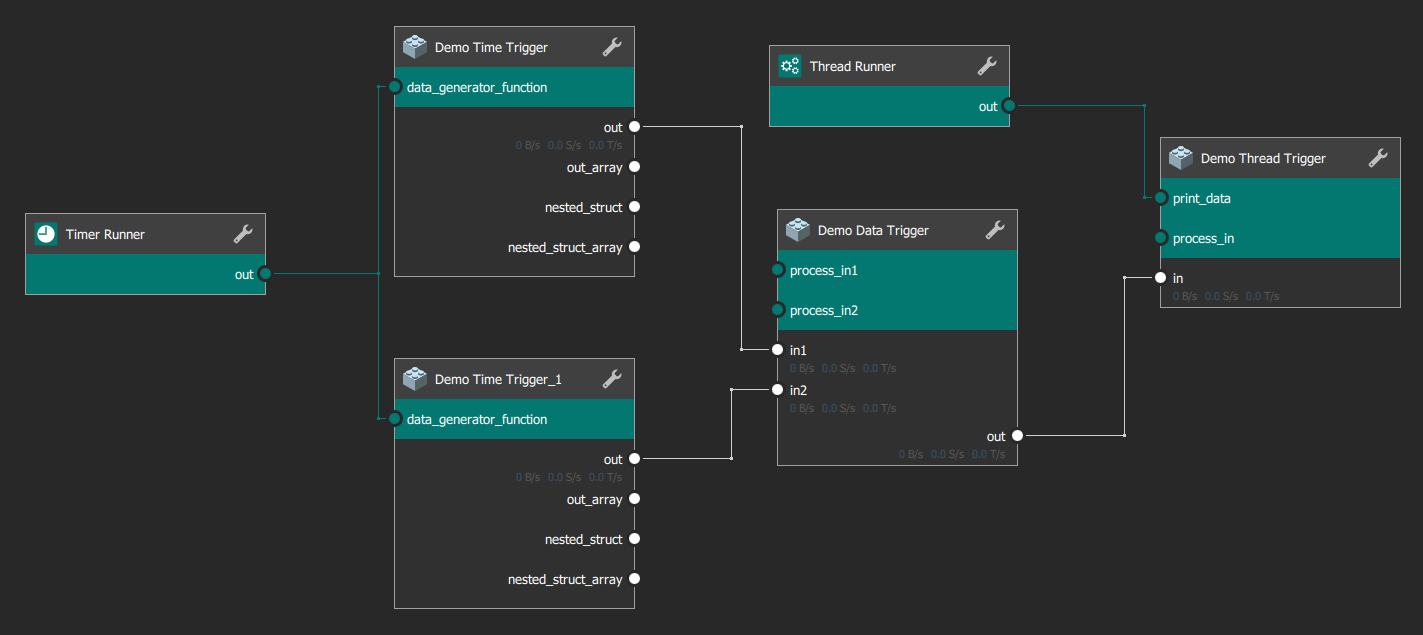
ADTF enables you to develop concrete (automotive) functionality and complex applications that transform, record and visualize data.
To stay flexible, configurable and re-useable you will use the ADTF Configuration Editor to create a filter graph, that is the major key point of the framework and streaming data.
The filter graph will give you the possibility to design an application with small processing parts (filters) those fulfill a particular task.
It is recommended to implement and design filters to reuse them in more than one filter graph configuration.
Time - The term time is used in case of a continously raising value with clear defines time base. Time is not a value!Timestamp - The term timestamp is used in case of describing a moment of Time. This is a static value with a static offset to its time base.tTimeStamp - The type tTimeStamp is usually a timestamp in microseconds (if not, the declaration of a use needs to mark this explicitly).Data - Usually data are any kind of user defined signal, structs or memory.Streaming Data - Streaming Data is a continous data flow which have a time relation on each data by a timestamp.
Named Graph Object
Each component that can be added to the filter graph uses the basic interface adtf::streaming::INamedGraphObject.
Filter
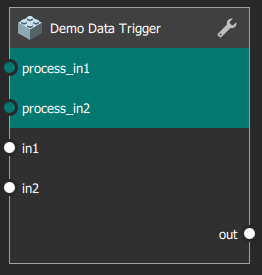
Filters are small processing units. Some predefined utility filters are part of the ADTF delivery, see Components.
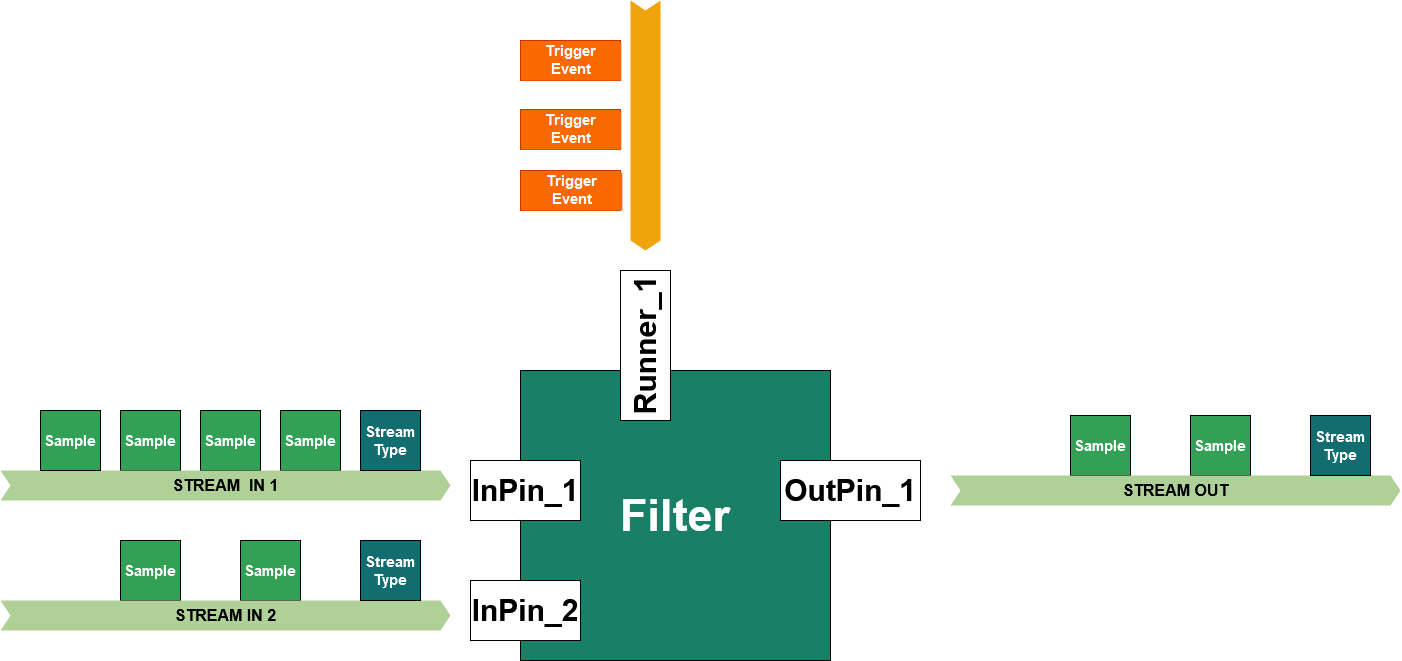
The filter is able to:
- receive data via input pins and there corresponding sample reader
- send data via output pins and there corresponding sample writer
- processing data in the context of runners (also called trigger contextes, runnables, runnable functions, callables)
Filters can be used to:
- decode streaming data from streaming sources like i.e. CAN raw data or FlexRay cycles
- pre-process incoming data and prepare it for a algorithm implementation
- re-calculate and merge incoming data by a fancy algorithm implementation
- implement a loop controller
- receive incoming data and show, log or display it in a human readable way
- ... and many things more.
You can setup a filter with properties to adjust its concrete behaviour or its initial state.
A simple filter state machine is to create, initialize and start a filter step-by-step.
The filter itself is designed to separate the data transmissions and runtime behaviour from each other.
This gives users of a specific filter the flexibility of trigger configuration while using the filter in a specific filter graph and connecting the so called runners.
Users can decide while configuring and using if the filter runs by
- a data trigger: the functionality runs on an incoming data event.
- a time trigger: the functionality runs on an incoming time event.
- Note
- Within the adtf::streaming a adtf::streaming::cFilterBase class implementation does exist.
We recommend to use the convenience API in the adtf::filter.
Use the ADTF Filter SDK as follows:
{
public:
cMyFilter()
{
}
};
Usually the filter will be packed into a plugin. This plugin mechanism of ADTF allows you to enrich the frameworks functionality and enables it to load i.e. filters into the runtime of ADTF.
To create a plugin for the above filter cMyFilter you must use following code:
Streaming Service
Streaming services - sources and sinks - are components to define system entry points and system exit points.
Usually these implementations are the first or last item of a data pipe or trigger pipe.
Streaming Source
A streaming source is a system entry point for samples and data triggers coming i.e. from a hardware. Usually you will implement any device link as streaming source.
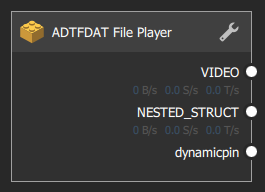
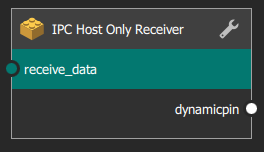
Streaming sources can be used to
- read streaming data like i.e. video streams from cameras, CAN messages from CAN-Bus devices, etc
- hard disk or stream reader to provide filebased or remaining bus simulation data
- network or interprocess connection to receive samples from a distributed system like ROS2 (Robotic operating system) or DDS (Data Distribution Service).
- Following requirements exists for Streaming Sources:
- Only output pins are allowed!
- Sources are allowed to create threads and timers, if it is not possible to use a runner.
- You are advised to describe your runtime behaviour within your documentation.
- Note
- Make sure to create data triggers (streaming::trigger, ManualTrigger) after finishing data transmission!
Streaming Sink
The streaming sink is an ADTF system exit point for samples and triggers.
Usually you will implement any device link as a streaming sink.
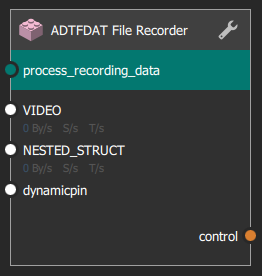
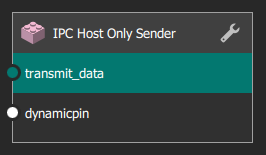
Streaming sinks can be used to
- write streaming data like raw CAN messages to a CAN-Bus device
- write FlexRay cycles or Automotive Ethernet PDUs to devices
- create a hard disk access for filebased data logging and high performance recording
- Following requirements exist for streaming sinks:
- Only input pins are allowed!
- Sinks are allowed to create own threads and timers, if it is not possible to use a runner.
- You are advised to describe your runtime behaviour within your documentation.
- Warning
- Do not block an incoming trigger within your implementation!
As long as you block incoming triggers you block the trigger pipe.
Active Runner
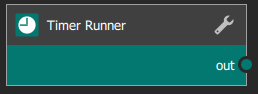
Active Runners are the single self-active objects of the filter graph.
They are the very beginngin of a trigger pipe.
By default ADTF will deliver following active runner you may use in you filter graph:
Sample Stream

ADTF provides a default implementation of the adtf::streaming::ISampleStream.
A sample stream is a mediator between pins and forward samples and data triggers.
Binding Proxy

The binding proxy will connect formal client/server interfaces between filters.
It always acts as mediator between these clients and servers.
Have a look at the Example Demo Interface Binding, to see how to program and use it.
Filter Graph
To create and setup a filter graph you have different building blocks and components (graph objects).
These components can be connected to each other.
Filter Graph State State Machine
The filter graph states can be set by the same interface function like the filter, the adtf::streaming::IFilter::SetState (adtf::streaming::IFilterGraph::tFilterGraphState) method.
Usually the filter graph is managed together with the streaming graph by the Session Manager. It lives only while Runlevel adtf::base::tADTFRunLevel RL_FilterGraph and adtf::base::tADTFRunLevel RL_Running.
Please have a look at Session Initialization to understand the states of the filter graph.
Filter State Machine
The following state machine is provided by the adtf::streaming::cFilterBase and implementation.
Streaming Service State Machine (within Filter Graph)
Client/Server Connections
A Filter can define some common functionality which must be used by others through a interface agreement:
- To publish such an interface you can define a
IBindingServer
- To subscribe and use such an interface you can define a
IBindingClient
While interconnecting these items the client can obtain the servers interface.
- Warning
- Do not use interface binding to add samples to the data pipe or to trigger the trigger pipe.
Otherwise you could have undefined behaviour!
Connection Overview
To build up a graph synchronous connections are part of a trigger pipe.
Connections have a category left, middle or right and some constrainst which item is connectable to whom.
Please consider the following table:
- Note
- Note that the Substream Selector as special adaption of the Sample Stream also implements an
ISampleStream and can be so the replacement of any sample stream occurence within the overview.
Subgraph
Subgraphs are filter graph instances that are added to another filter graph.
- Note
- These sub Graphs are treated like filters!
On changing filter graphs state the subgraph state will be set before all other objects as one specific characteristic. See filter state machine for more details.
Filter Graph Ports
Since filter graphs can be added as a subgraph the filter graph must clearly define its data binding, interface binding and runtime behaviour to the filter graph it is embedded to (like a "common" filter as well).
The filter graphs data access points are data inports and data outports:
- Data outports are treated similar to output pins of the subgraph to define outgoing streaming data to the data pipe.
- Data inport are treated similar to input pins of the subgraph to define incoming streaming data from the data pipe.
The filter graphs runtime behaviour can be configured with the help of runner inports:
- Runner inports are treated similar runner input pins and will forward the trigger pipe.
The filter graphs interface binding items are interface inports and interface outports.
- To forward a server object you can add a interface outport.
- To forward an client object you can add a interface inport.
Property
Properties are the possibility to adjust some capabilities of the filter without re-compiling.
While using it within the filter graph you can adjust its behaviour.
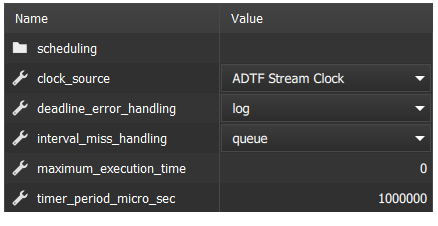
- Example for a property
{
public:
ADTF_CLASS_ID_NAME(cMyFilter,
"my_constant_data_generator.filter.example.cid",
"My Constant Data Generator");
cMyFilter()
{
using namespace adtf::filter;
using namespace adtf::streaming;
m_pWriter = CreateOutputPin<pin_writer<uint32_t>>("OutPin_1", stream_type_plain<uint32_t>());
using namespace std::chrono_literals;
m_pRunner =
CreateRunner(
"Runner_1", cTimerTriggerHint(100ms));
}
adtf::streaming::IRunner* ) override
{
uint32_t nCurrentValueToWrite = m_nConstantProperty;
RETURN_IF_FAILED(m_pWriter->Write(tmTimeOfTriggering, nCurrentValueToWrite));
}
private:
adtf::streaming::IRunner* m_pRunner = nullptr;
adtf::base::property_variable<uint32_t> m_nConstantProperty = 0;
};
For a full description see adtf::base.
Streaming Graph
- Warning
- Please note that as of ADTF 3.8 and later, we are no longer advocating the use of streaming graphs but encourage you to use a filter graph instead. There is no support anymore, even no more UI for it, some defintions, classes and states only exists because of non-breaking ABI requirements.
The idea of the separation was that you can exchange arounded functionality (e.g. hardware devices or playback/simulation interfaces) and reuse the embedded core functionality (as filter graph within the streaming graph) in different scenarios and runlevels.
But you can design this scenario also with filter graphs and subgraphs, even included from different sessions.
Data Pipe
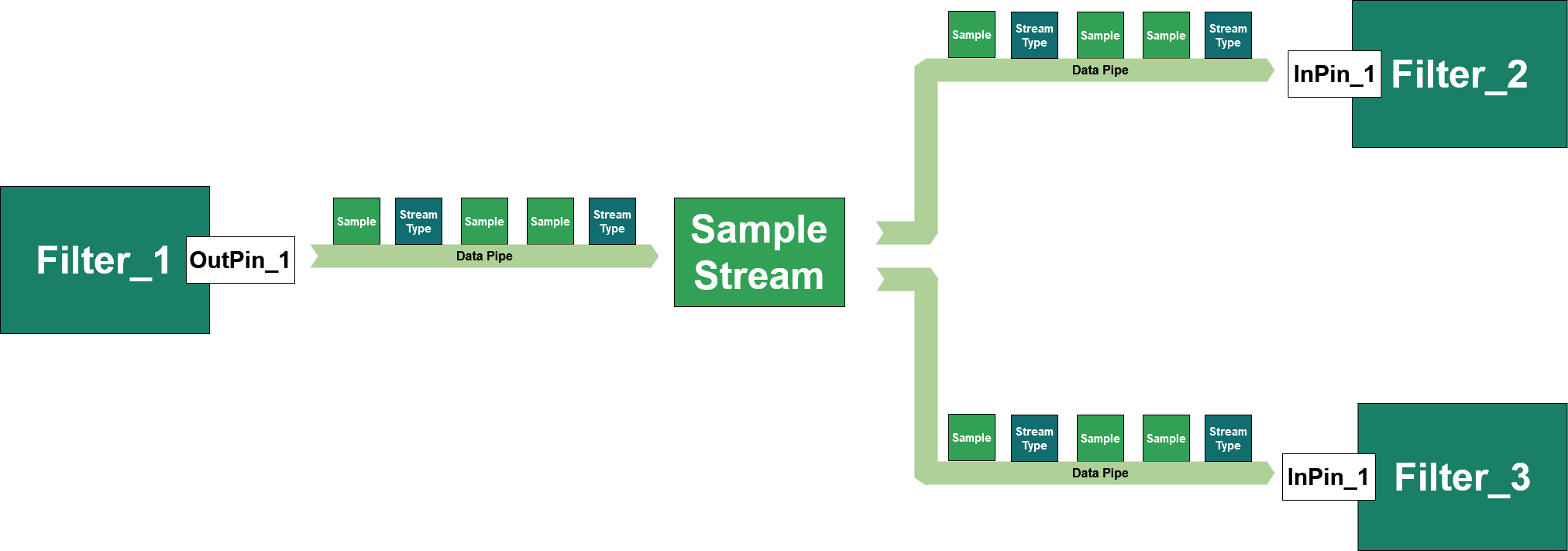
The data pipe within a filter graph is part of the connection between sample writers and sample readers.
Within ADTF one common data pipe starts at the sample writer and its output pin of a sending filter, over one sample stream, to one or more input pins and their corresponding sample readers.
Sample
Data are packed into so called samples that are containers for any kind of data and refer to streaming data as well as some important meta information (adtf::streaming::ISample)
Samples have:
- a timestamp to get a time relation for each data.
- a sample buffer which is usually a reference to a memory block containing the user data.
- optional sample info
- an optional
substream id for substreams (see adtf::streaming::ISample::SetSubStreamId / adtf::streaming::ISample::GetSubStreamId)
GetTimeNs() const : tNanoseconds
SetSubstreamId(uint32_t) : void
GetSubstreamId() const : uint32_t
Lock(ISampleBuffer) const :
tResultGetSampleInfo(ISampleInfo) :
tResultA_UTILS_NS::cResult tResult
For backwards compatibility and to bring latest version into scope.
Definition result.h:775
- Note
- There is no classifier on the sample that reveals what kind of data is being sent.
A classification is done via stream type being also part of the stream.
Sample Buffer
The sample buffer is the content of a sample and references a memory block.
Sample Info
There is a possibility to add additional information to a sample. Visit the adtf::streaming::ISample::GetSampleInfo method for getting to know how to add these additional values to the samples instance.
- Warning
- Do not use this to add data!
Using it with more than two values is expensive!
Set an additional sample info value:
double m_fValueToWrite;
m_fValueToWrite = 124;
*m_pWriter << oSampleData.Release();
Get an additional sample info value:
Referenced Sample
There are possibilities to reference data instead of copying it, but usually the filter receiving samples will queue them.
For that, you have to make sure, the referenced data lives as long as the sample lives within the filter graph. If you really need to use that have a look at adtf::streaming::cReferenceSample.
- Note
- So please keep in mind: If you are using referenced sample buffers, your whole application must be able to deal with that!
Usually this does not work for filters you did not program by yourself.
Stream Type
A stream type has:
- A unique name for stream meta type, i.e.
adtf/video, adtf/default, adtf/audio or adtf/plaintype.
- Properties to describe the content of samples.
A stream meta type defines which properties are set within the stream type.
- For a
adtf/video this will be i.e. width, height, bitsperpixel, pixelformat.
- For a
adtf/default this will be a structural description of structral data with md_struct and md_definitions
- See also Overview of writing and reading samples
As an example, one possible instance is a description for a video stream with a unique type name adtf/image.
A video stream may be described via following properties:
pixel_width - 800 ... The width of one frame of the video stream as a int32_t - integer value of 800.pixel_height - 600 ... The height of one frame of the video stream as a int32_t - integer value of 600.format_name - A(8)R(8)G(8)B(8) ... The format name of the of the video stream as a string value of A(8)R(8)G(8)B(8) describing the pixelformat.
To instantiate such a stream type we may use the class adtf::streaming::cStreamType or the template adtf::streaming::stream_type.
void create_streamtype_video()
{
}
Definition object_ptr.h:384
Namespace for the ADTF Streaming SDK.
Definition bindingproxyinport.h:14
tResult set_property(IStreamType &oStreamType, const char *strNameOfValue, VALUETYPE oValue)
Definition streamtype_intf.h:257
Namespace for the ADTF uCOM SDK.
Definition adtf_system.h:324
object_ptr< Implementation > make_object_ptr(Args &&... args)
Alias always bringing the latest version of ant::make_object_ptr() into scope.
Definition object_ptr_utilities.h:160
Stream Meta Type
The possible stream types will be defined by known stream meta types, which defines the possible unique name and the set of possible properties corresponding to that name.
As shown in the example above, an instance of a stream type can only be created with such a stream meta type definiton.
The stream meta type must implement the adtf::streaming::IStreamMetaType interface. This interface will provide following information:
Custom Stream Meta Types
The stream type implementation class adtf::streaming::stream_type will use the generator class adtf::streaming::stream_meta_type, which defines the unique name of the stream meta type by a variable MetaTypeName.
Additionally, a set of existing properties and there default values are set within the static function SetProperties.
Use following implementation for own stream meta type definitions:
struct my_custom_stream_meta_type
{
static constexpr const tChar *const MetaTypeName = "cppDev/my_custom_type";
static constexpr const tChar *const SecretContentID = "secret_content_id";
static constexpr const tChar *const Version = "version_of_type";
{
pProperties->SetProperty(adtf::base::property<uint16_t>(SecretContentID, 0));
pProperties->SetProperty(adtf::base::property<adtf_util::cString>(Version, "cppDev 2020-1.0"));
}
};
If you want to use the custom stream type use following code:
void usage_of_own_type()
{
set_property(*pStreamType, my_custom_stream_meta_type::SecretContentID, 12);
}
AcceptType and IsCompatible
One important part of the data pipe between filters are stream type updates.
Before a sample has been received at least one stream type will be received that describes the sample content.
Usually, the implementation can handle only incoming data with one clear defined stream type. This clear defined type is usually set while setting up the readers for a corresponding pin:
RETURN_IF_FAILED(create_pin(*this, m_oReader1, "in1", pStreamType));
RETURN_IF_FAILED(create_pin(*this, m_oReader2, "in2", pStreamType));
While receiving a stream type the default implementation of the adtf::streaming::cSampleReader will call internally an AcceptType function to accept or reject the incoming type.
This implementation uses either the given user callback function (adtf::streaming::cSampleReader::SetAcceptTypeCallback) or the implementation of the adtf::streaming::IStreamMetaType::IsCompatible function of the current valid type.
To do so, the stream meta type implementation of the current valid type is retrieved and its IsCompatible function is used.
- Note
- These
IsCompatible implementations will not automatically check the unique stream meta type name for equality!
Sometimes it will have a look at the values of the properties only. For a complete overview of all delivered stream meta types, their properties and the IsCompatible implementation see next chapter.
operator== and is_compatible
The adtf::streaming::operator== will only check the stream meta type names of the given stream type (adtf::streaming::IStreamType) and compares them.
The global function adtf::streaming::is_compatible will follow the IsCompatible implementation of the right-hand side stream type ExpectedType and its corresponding the stream meta type.
- Note
- Mind, the stream meta type of
oExpectedType defines the IsCompatible comparison method.
For example:
struct INT32
{
int32_t m_nValue;
};
oDescriptionForINT32.Add("m_nValue", &INT32::m_nValue);
Default Stream Meta Types
This section will give an overview of all default ADTF Stream Meta Types and their properties.
Stream Meta Type "adtf/anonymous"
- Namespace
- Defined in namespace adtf::streaming.
- Stream Meta Type concept class
- adtf::streaming::stream_meta_type_anonymous
- Description
- Use this Stream Meta Type only if no property should be set and you do not share and record these data. Anonymous can be any kind of data.
- Generator class
- adtf::streaming::stream_type by calling:
stream_type<stream_meta_type_anonymous>();
- Properties
- No properties.
- IsCompatible
- This implementation of
IsCompatible will always return ERR_NOERROR and accept all other stream meta type names.
Fully documentation: adtf::streaming::stream_meta_type_anonymous::IsCompatible
Stream Meta Type "adtf/plaintype"
- Namespace
- Defined in namespace adtf::streaming
- Stream Meta Type concept class
- adtf::streaming::stream_meta_type_plain
- Description
- Use this Stream Meta Type if your sample data will be any of this type: bool, uint8_t, int8_t, uint16_t, int16_t, uint32_t, int32_t, uint64_t, int64_t, float, double or plain array T[], std::array, std::vector of them.
- Generator class
- adtf::streaming::stream_type_plain
- Properties
- IsCompatible
- Compatible to all other stream types of any stream meta type, where the following conditions are met:
Fully documentation: adtf::streaming::stream_meta_type_plain::IsCompatible
Stream Meta Type "adtf/default"
- Namespace
- Defined in namespace adtf::mediadescription
- Stream Meta Type concept class
- adtf::mediadescription::stream_meta_type_default
- Description
- Use this Stream Meta Type if your sample data are structured and the memory layout can be described via DDL Specification.
- Generator class
- Properties
- IsCompatible
- Compatible to all other stream types of any stream meta type, where the following conditions are met:
- the property value of the properties adtf::streaming::stream_meta_type_default::strMDDataSerialized are equal in both types (both serialized or both deserialized, default is "md_serialized"="false")
- the property values of adtf::streaming::stream_meta_type_default::strMDStructProperty and strMDDefinitionsProperty must be exactly the same, OR
- if the property values adtf::streaming::stream_meta_type_default::strMDStructProperty and adtf::streaming::stream_meta_type_default::strMDDefinitionsProperty are not equal the given complex types in strMDStructProperty must be semantically equal (see adtf_ddl::cDDLCompare::IsEqualType)
Fully documentation: adtf::streaming::stream_meta_type_default::IsCompatible
Stream Meta Type "adtf/image"
- Namespace
- Defined in namespace adtf::streaming
- Stream Meta Type concept class
- adtf::streaming::stream_meta_type_image
- Description
- Use this Stream Meta Type for describing a video stream with single frames and there format and set the values with set_stream_type_image_format.
- Generator class
- adtf::streaming::stream_type_image
- Properties
- IsCompatible
- Uses the default implementation of
IsCompatible and will return ERR_NOERROR only if:
Fully documentation: adtf::streaming::cStreamMetaType::IsCompatible
Stream Meta Type "adtf/audio"
- Namespace
- Defined in namespace adtf::streaming
- Stream Meta Type concept class
- adtf::streaming::stream_meta_type_audio
- Description
- Use this Stream Meta Type for describing a audio stream with samples and sample rate.
- Generator class
- stream_type_audio
- Properties
- IsCompatible
- Uses the default implementation of
IsCompatible and will return ERR_NOERROR only if:
Fully documentation: adtf::streaming::cStreamMetaType::IsCompatible
Stream Meta Type "adtf/string"
- Namespace
- Defined in namespace adtf::streaming
- Stream Meta Type concept class
- adtf::streaming::stream_meta_type_string
- Description
- Use this Stream Meta Type if your sample data will be any of this type: std::string, std::u16string.
- Generator class
- adtf::streaming::stream_type_string
- Properties
- IsCompatible
- Compatible to all other stream types of any stream meta type, where the following conditions are met:
Fully documentation: adtf::streaming::stream_meta_type_string::IsCompatible
Stream Meta Type "adtf/substreams"
- Namespace
- Defined in namespace adtf::streaming
- Stream Meta Type concept class
- adtf::streaming::stream_meta_type_substreams
- Description
- Use cSubStreamTypes to create a Stream Type instance for this Stream Meta Type.
- Creator class
- adtf::filter::cSubStreamTypes
- Properties
- IsCompatible
- This implementation of
IsCompatible will accept all other stream meta types and will return ERR_NOERROR only if:
Fully documentation: adtf::streaming::stream_meta_type_substreams::IsCompatible
Substreams
Using substreams is one possibility to reduce pin and connection appearance within the filter graph.
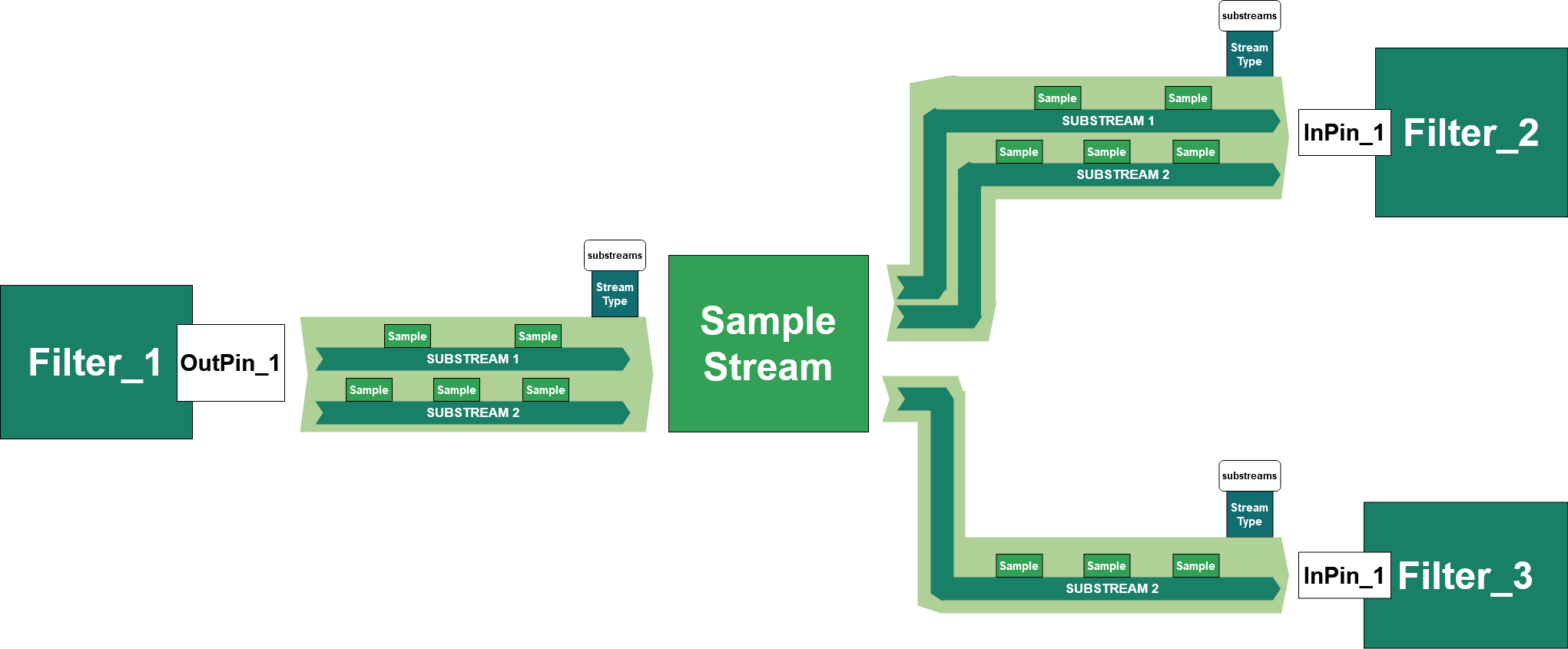
Substreams have been introduced to address handling of large amounts of different signals or complex data structures by multiplexing them on single output pin/sample stream.
This includes two new concepts:
Definition
Using substreams is one possibility to reduce pin and connection appearance within the data pipe of the filter graph.
They are defined by using a special stream type with the adtf/substreams stream meta type.
This stream type stores the following information for each substream:
Name, the name of the substream (i.e. the name of the signal of which the samples are streamed via this substream).Id, a numeric id identifing the samples of the substream.Stream Type, the stream type of the substream.
See adtf::filter::cSubStreamTypes for information on how to create such a substream stream type.
Each sample transmitted via such a sample stream is then assigned the id of the substream that it belongs to, see adtf::streaming::ISample::SetSubStreamId and adtf::streaming::set_sample_substream_id().
To select samples of a specific substreams for processing in other filters we provide a special sample stream implementation Substream Selector, that will select and forward only the stream types and samples of a single substream.
You can use the Substream Dissector to dissect a "normal" sample stream into substreams containing all individual elements.
We provide the following programming examples on how to use substreams:
Request Handling
In order to handle dynamic processing of substreams we introduced the substream request handling architecture.
This mechanism enables consumers the inform sources about the data that they are interested in.
So by default all substream sources will not provide any data if no one requests anything.
The new adtf::streaming::IStreamingRequests interface is forwarded transparently via sample streams.
Via this interface a consumer can tell a source which substream samples it likes to recieve.
For convenience access to this interface is provided via the default sample reader implementation (adtf::streaming::cSampleReader::RequestSamples).
To provide request support for substreams you can use the adtf::streaming::requestable_writer template, but most of the time just use the adtf::filter::cGraphObject::CreateRequestableOutputPin method.
- Note
- All sinks like components (recorders, displays, ...) that consume substreams are required to request transmission of the substreams that they are interested in.
They will not receive any data otherwise!
-
During playback, requests on streams originating from the player will proceeed, but do not have any effect on which samples are transmitted via the sample stream.
We provide the following programming examples on how to provide request support for substreams:
Output Pin and Sample Writer/Pin Writer
The data a filter can create and transmit are samples.
The formal description and classification of those samples and its content is done by a stream type.
Within the filter you need to create output pins to identify a connection point to this filter, where data can be written out.
Write samples and set stream types onto a connected stream with the help of a sample writer (adtf::streaming::ISampleWriter).
Have a look at the docummentation of the adtf::filter::cGraphObject::CreateOutputPin function to add a output pin to the filter:
{
public:
cMyFilter()
{
}
private:
adtf::streaming::ISampleWriter* m_pWriter = nullptr;
};
Creating and writing samples
Samples are memory buffers. You should always copy your data into these sample buffers.
The following examples of writing data to a sample are recommended:
Use of output_sample_data<T> template:
m_nCounter = 124;
*m_pWriter << output_sample_data<uint64_t>(tmTimeOfTriggering, m_nCounter);
Use of output_sample_data<T> template and set the sample time:
m_nCounter = 124;
*m_pWriter << oSampleData.Release();
Set a memory buffer (and so copy the content) to the sample:
m_nCounter = 124;
RETURN_IF_FAILED(
alloc_sample(pSample, tmTimeOfTriggering));
RETURN_IF_FAILED(pSample->Set(tmTimeOfTriggering, &m_nCounter, sizeof(m_nCounter)));
*m_pWriter << ucom_object_ptr_cast<ISample>(pSample);
Write the content of a memory buffer to the samples buffer:
m_nCounter = 124;
RETURN_IF_FAILED(
alloc_sample(pSample, tmTimeOfTriggering));
{
RETURN_IF_FAILED(pSample->WriteLock(oBuffer, sizeof(m_nCounter)));
}
*m_pWriter << pSample;
Write a string content to the sample buffer:
std::string strWriteToSampleString("This is a cString I want to write!");
RETURN_IF_FAILED(
alloc_sample(pSample, tmTimeOfTriggering));
{
RETURN_IF_FAILED(pSample->WriteLock(oBuffer, strWriteToSampleString.size()));
}
*m_pWriter << pSample;
Type based writing to a output pin writer:
cMyFilterTypeBased()
{
m_pWriter = CreateOutputPin<adtf::filter::pin_writer<uint64_t>>("OutPin_1");
using namespace std::chrono_literals;
m_pRunner =
CreateRunner(
"Runner_1", cTimerTriggerHint(100ms));
}
adtf::streaming::IRunner* ) override
{
RETURN_IF_FAILED(m_pWriter->
Write(tmTimeOfTriggering, m_nCounter++));
return {};
}
private:
adtf::streaming::IRunner* m_pRunner = nullptr;
uint64_t m_nCounter = 0;
Input Pin and Sample Reader/Pin Reader
The incoming samples can be read via input pins and sample readers.
Input pins identify a connection point to the filter. The incoming stream contains samples and stream types. Sample readers (interface adtf::streaming::ISampleReader) are queues to buffer the incoming data.
Usually you will create one reader per input pin or one input pin per reader.
The simplest way to create an input pin is to call the adtf::filter::cGraphObject::CreateInputPin function within the CTOR.
- Example to create a input pin in filters CTOR
#include <chrono>
#include <cinttypes>
{
public:
cMyFilter()
{
using namespace std::chrono_literals;
m_pRunner =
CreateRunner(
"Runner_1", cTimerTriggerHint(100ms),
true);
}
adtf::streaming::IRunner* pRunner) override
{
if (m_pRunner == pRunner)
{
adtf::ucom::object_ptr<const adtf::streaming::ISample> pSample;
while (
IS_OK(m_pReader1->GetNextSample(pSample)))
{
adtf::streaming::sample_data<uint64_t> oSampleCounter(pSample);
auto nTime = oSampleCounter.GetTime();
LOG_INFO(
"Received data on \"InPin_1\": %" PRIu64
" at time %" PRIi64, *oSampleCounter, nTime);
}
}
else
{
}
return {};
}
private:
adtf::streaming::IRunner* m_pRunner = nullptr;
adtf::streaming::ISampleReader* m_pReader1 = nullptr;
};
Reading samples
The following examples of reading data from samples are recommended:
- Reading samples with
GetNextSample
{
auto nTime = oSampleCounter.GetTime();
LOG_INFO(
"Received data on \"InPin_1\": %" PRIu64
" at time %" PRIi64, *oSampleCounter, nTime);
}
- Reading samples with streaming operator
bool bEndOfStream = false;
while (!bEndOfStream)
{
*m_pReader1 >> pSample;
if (pSample)
{
auto nTime = oSampleCounter.GetTime();
LOG_INFO(
"Received data on \"InPin_1\": %" PRIu64
" at time %" PRIi64, *oSampleCounter, nTime);
}
else
{
bEndOfStream = true;
}
}
- Access sample buffer memory with
static_cast
{
RETURN_IF_FAILED(pSample->Lock(oBuffer));
auto pValue = static_cast<const uint64_t*>(oBuffer->GetPtr());
LOG_INFO(
"Received data on \"InPin_1\": %" PRIu64
" at time %" PRIi64, *pValue, nTime.nCount);
}
- Read sample buffers content with
adtf_memory for trivial types
{
RETURN_IF_FAILED(pSample->Lock(oBuffer));
uint64_t nValue = {};
LOG_INFO(
"Received data on \"InPin_1\": %" PRIu64
" at time %" PRIi64, nValue, nTime);
}
- Read sample buffers content with
adtf_memory for string types
{
RETURN_IF_FAILED(pSample->Lock(oBuffer));
std::string strValue = {};
LOG_INFO(
"Received data on \"InPin_1\": %s at time %" PRIi64, strValue.c_str(), nTime);
}
Reading stream types
All examples above are using untyped data (anonymous data)! The filter implementation is receiving data while the code expects always some tUInt64 values. To make sure the filter will only accept expected sample content, the data must be classified and stream typed by a stream type. The stream type itself is part of the stream. While receiving, you will always get a stream type first, then samples and a stream type again if it changes.
Reading samples by data trigger
The examples above used only runners which should be connected within the filter graph with an active (timer) runner.
But we can also use a data trigger in our code, so we will be called after an incoming data event on a specified pin.
#include <cinttypes>
{
public:
cMyFilter()
{
using namespace adtf::streaming;
using namespace adtf::filter;
stream_type_plain<uint64_t>(),
false,
false);
pCreatedReader1->SetAcceptTypeCallback(
{
return is_compatible(pStreamIncomingType, stream_type_plain<uint64_t>());
});
m_pReader1 = pCreatedReader1;
m_pRunner =
CreateRunner(
"Runner_1", cDataTriggerHint(
"InPin_1"),
true);
}
adtf::streaming::IRunner* pRunner) override
{
if (m_pRunner == pRunner)
{
adtf::ucom::object_ptr<const adtf::streaming::ISample> pSample;
while (
IS_OK(m_pReader1->GetNextSample(pSample)))
{
adtf::streaming::sample_data<uint64_t> oSampleCounter(pSample);
auto nTime = oSampleCounter.GetTime();
LOG_INFO(
"Received data on \"InPin_1\": %" PRIu64
" at time %" PRIi64, *oSampleCounter, nTime);
}
}
else
{
}
return {};
}
private:
adtf::streaming::IRunner* m_pRunner = nullptr;
};
As you might see in the code example: There is no change on the Process() implementation.
This is one of the ADTF 3 benefits! It might be easy to configure data or time-triggered behaviour within a very late stage.
- Data Trigger with
ProcessInput()
For your convienience you are able to forward each data trigger to a single method, the ProcessInput() method. Also one single AcceptType() is possible.
{
public:
cMyFilter()
{
adtf::streaming::stream_type_plain<uint64_t>(),
true,
true);
adtf::streaming::stream_type_plain<uint64_t>());
}
{
if (pReader == m_pReader1)
{
}
else if (pReader == m_pReader2)
{
}
return {};
};
{
if (pReader == m_pReader1)
{
}
else if (pReader == m_pReader2)
{
}
return {};
}
private:
adtf::streaming::IRunner* m_pRunner = nullptr;
adtf::streaming::ISampleReader* m_pReader1 = nullptr;
adtf::streaming::ISampleReader* m_pReader2 = nullptr;
};
The good thing about this single point of processing is:
- It is easy to use.
- It is already synchronized.
Each ProcessInput() and each AcceptType() locks the filter, no parallel call within the filter, no race conditions can appear.
But you should also consider adtf::filter::cGraphObject::CreateInputPinWithCallback before starting to implement huge if-else-if or switch-case commands.
Trigger Pipe
The trigger pipe within ADTF is a connection based trigger path through the filter graph.
Usually it starts with an active runner that triggers the connected items like a runner of a filter.
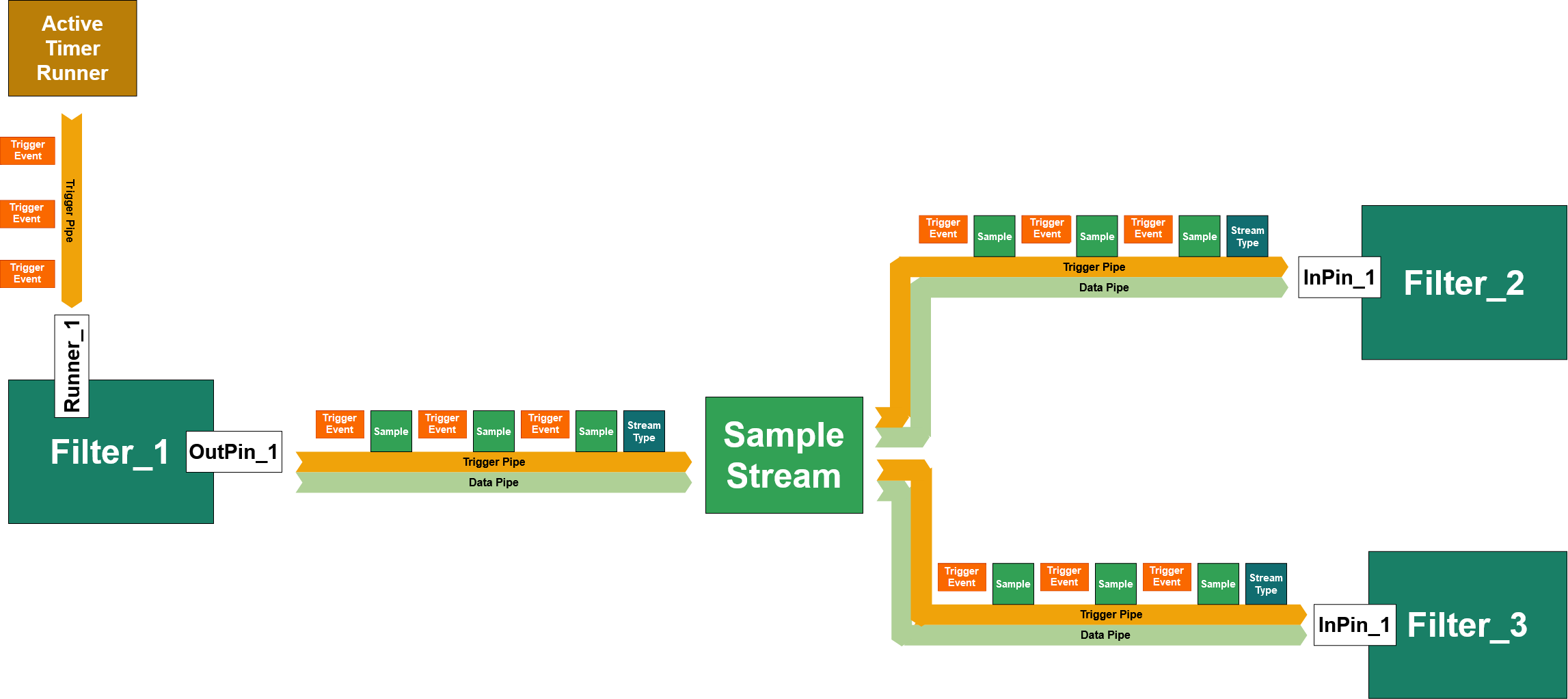
The above example of a trigger pipe shows the Timer Runner as a adtf::streaming::ITriggerPipeSource.
Trigger pipe sources are the very beginning of a trigger pipe.
Each connected item can be discovered with the help of the adtf::streaming::ITriggerPipeSource interface. The connected items of a the trigger pipe are called adtf::streaming::ITriggerPipeItem.
They are also sources for the further items in the trigger pipe.
At the end, a collection of trigger pipes in your filter graph will show you a callgraph and the critical paths.
- Note
- The trigger event as seen in the picture above is not really an object, it is a adtf::base::IRunnable::Run (adtf::base::IRunnable::tActivationType
RUN_TRIGGER) call on adtf::streaming::ITriggerPipeItem.
Following components can be adtf::streaming::ITriggerPipeSource only:
Following components can be adtf::streaming::ITriggerPipeItem:
Runner Input Pin and Trigger
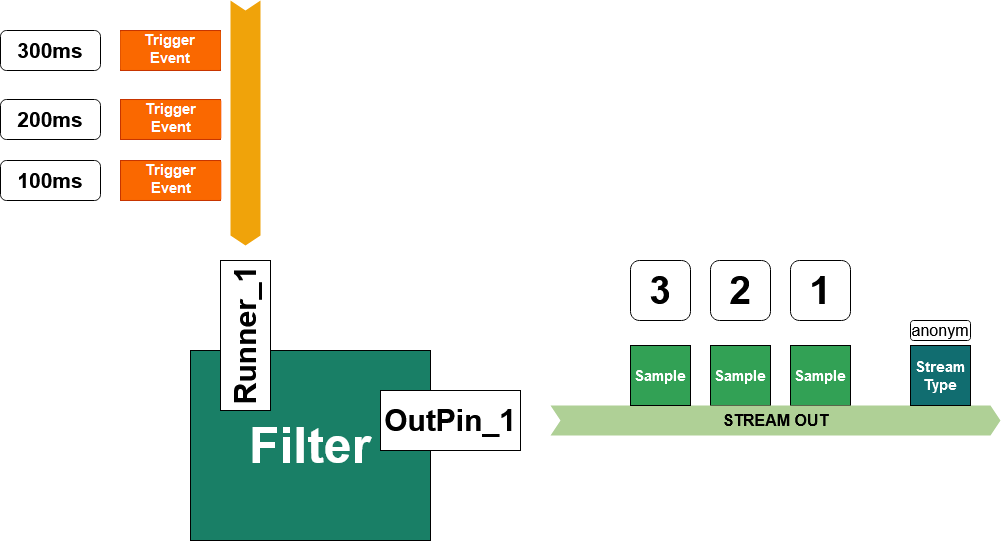
Each filter needs at least one function that reacts on trigger events while the filter is processing data in the running state.
Within filters these events are called triggers. To "catch" a trigger you should define a so called runner that is an entry point to connect
- a (internal) data trigger ... for incoming events by sample reader.
- a time trigger ... for events that are configured within the filter graph by active runner.
The above filter with one output pin and one runner input pin can be created by the following code:
#include <chrono>
#include <cinttypes>
{
public:
cMyFilter()
{
using namespace std::chrono_literals;
m_pRunner =
CreateRunner(
"Runner_1", cTimerTriggerHint(100ms));
}
adtf::streaming::IRunner* pRunner) override
{
if (m_pRunner == pRunner)
{
LOG_INFO(
"Time of triggering %" PRIi64, tmTimeOfTriggering.nCount);
m_nCounter++;
*m_pWriter << adtf::streaming::output_sample_data(tmTimeOfTriggering, m_nCounter);
}
else
{
}
return {};
}
private:
adtf::streaming::ISampleWriter* m_pWriter = nullptr;
adtf::streaming::IRunner* m_pRunner = nullptr;
uint64_t m_nCounter = 0;
};
Sample Stream Operation Modes
There are different operation modes intended within current adtf::streaming API design, but only two modes are realized yet. The delivered default Sample Stream can be used within the filter graph by operating in PushRead Mode.
PushRead Mode - Synchronous Data Pipes
With the Streaming API the adtf::streaming::ISampleStreamAccess::PushRead is defined.
While writing data onto a stream the sample stream will have different states:
Sample Stream - write()
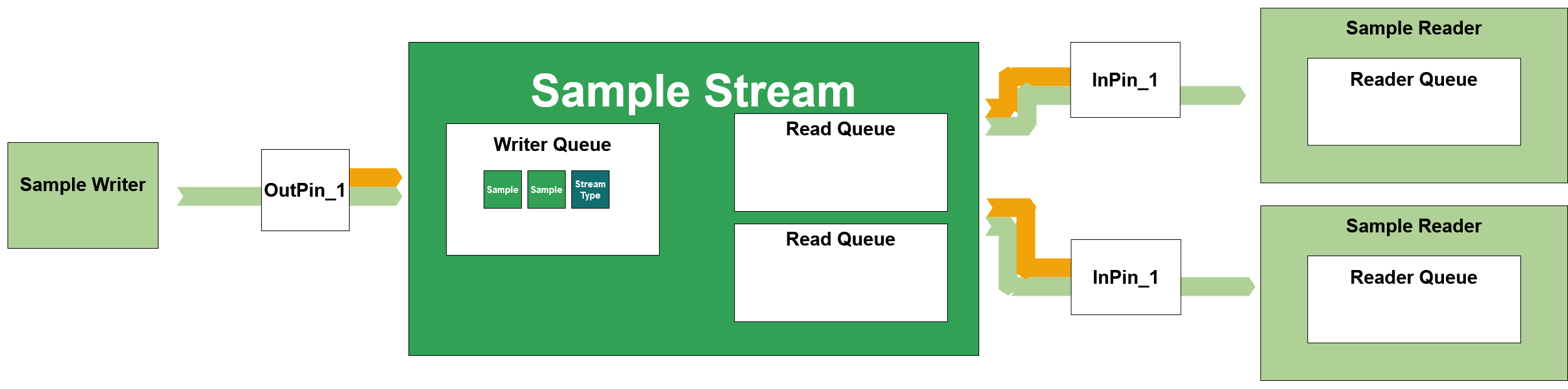
- Writing samples:
*pSampleWriter << pSample << pSample;
After writing data onto a sample stream the samples will be queued within a writers queue. There is no trigger event yet emitted!
- Note
- Keep in mind: At least one stream type will be written onto the stream before any kind of data is transmitted.
Sample Stream - flush()
After flushing the sample writer the samples will be queued in all sample reader queues.
There is only a temporary reader queue within the sample stream to lock the content a short time.
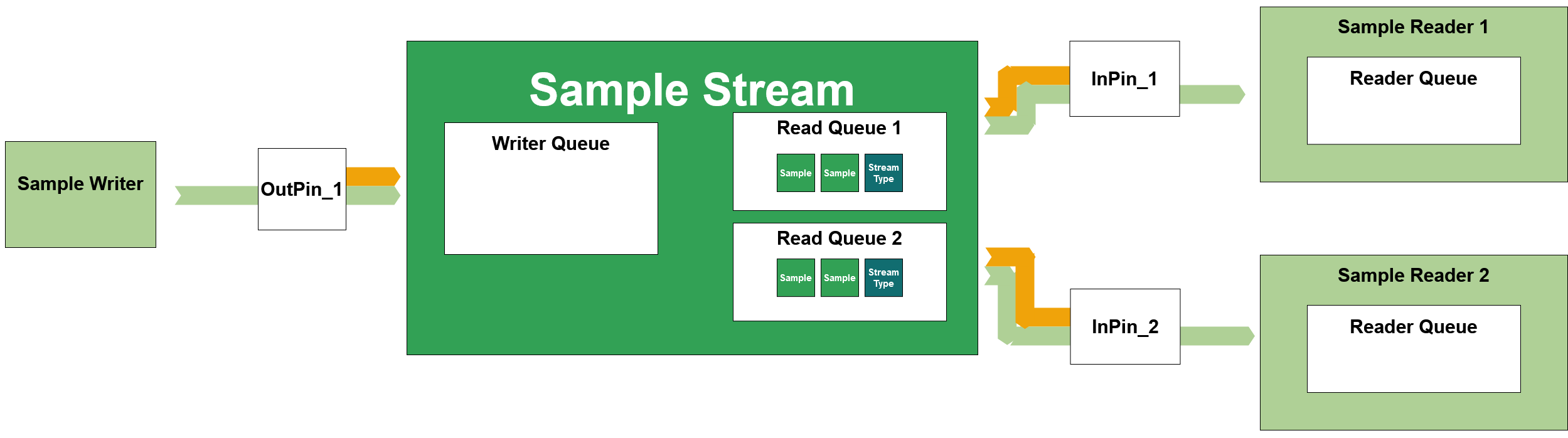
WRITER_TYPE & flush(WRITER_TYPE &oWriter)
Definition streaming_functions.h:22
Flushing the writer queue will temporarly forward the samples to Reader Queues.
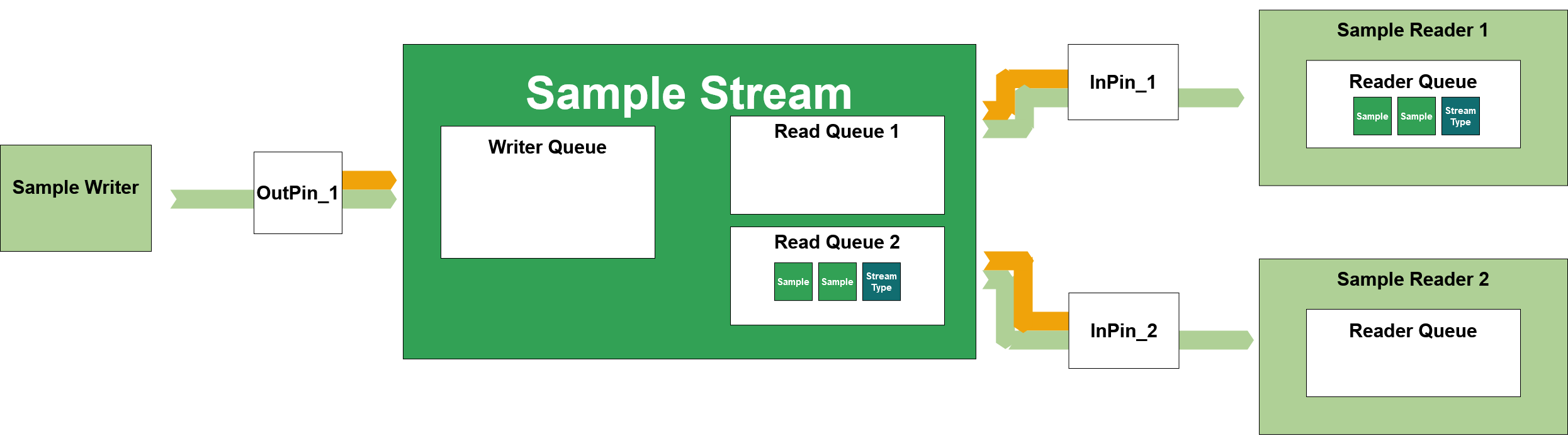
Sample Stream Flush 2
pSampleReader1->Run(RUN_PUSH);
pReadQueue1->Read();
Still within the Flush() call, the samples (and stream types) will be read into the sample reader queue of the sample reader 1 by a push event.
A sample reader using the PushRead mode MUST read the samples immediatelly while the push event appears, otherwise the samples are lost for this reader.
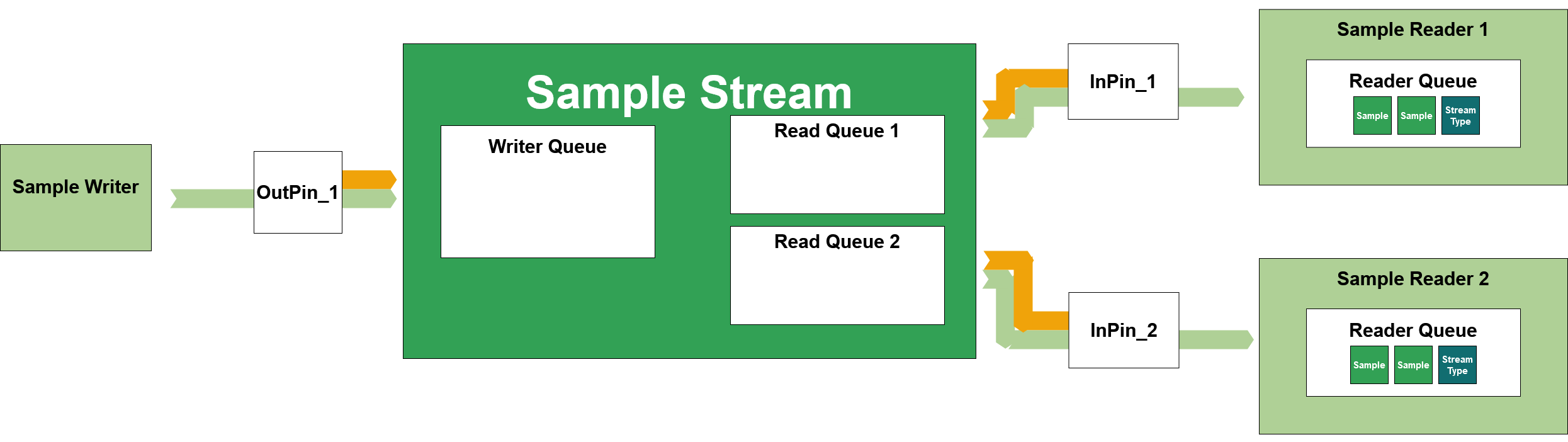
Sample Stream Flush 3
pSampleReader2->Run(RUN_PUSH);
pReadQueue2>Read();
The samples (and stream types) will be read into the sample reader queue of the sample reader 2 by a push event.
This is now the end state of the queues after flushing.
It is possible to use many different kinds of sample readers/pin readers (see adtf::filter).
If using the filter implementation you do not need to call that flush separately!
Sample Stream - trigger()
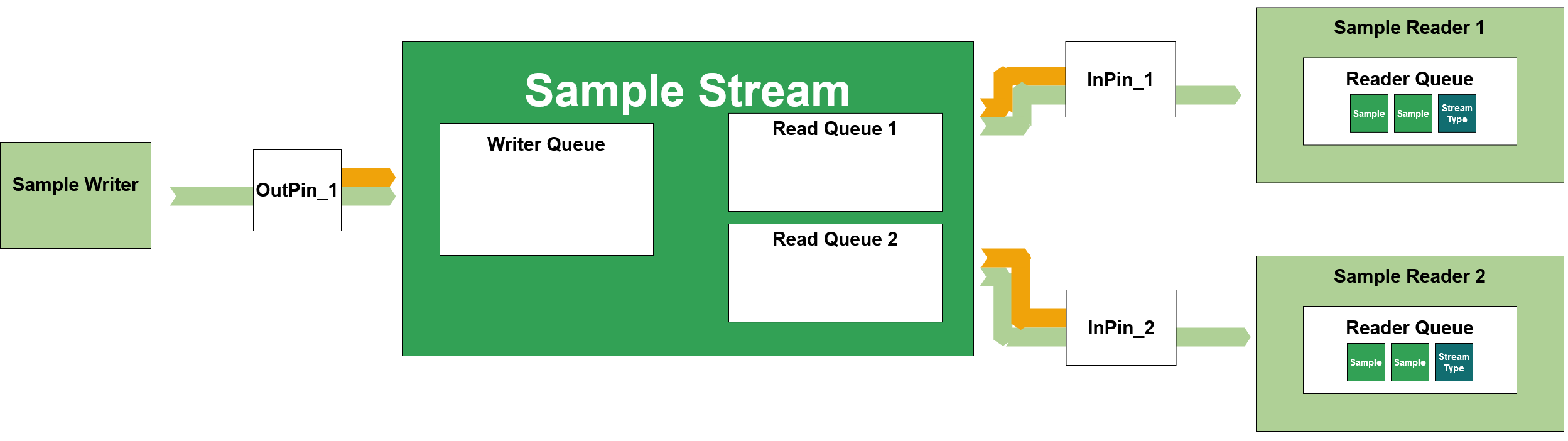
Sample Stream Trigger
Data trigger is forwarded to the output pin:
pSampleWriter << pTrigger;
Data trigger is received on the input pin.
The trigger call is to create a data trigger on the trigger pipe.
Following call sequence:
OutPin_1->Run(RUN_TRIGGER)Sample_Stream->Run(RUN_TRIGGER)InPin_1->Run(RUN_TRIGGER)InPin_2->Run(RUN_TRIGGER)
Asynchronous Mode - Asynchronous Data Pipes
- Note
- This mode is not yet implemented in ADTF 3!
But so far: there is no Push event.
The reader queues within the Sample Stream (not within the Sample Readers) are used and each sample reader directly reads from there.
Push Mode - Queue Free Data Pipes
- Note
- Detailed description in progress... stay tuned!
Inner Trigger Pipe of a Filter
Usually, a filter works in a context of a adtf::base::IRunnable::tActivationType RUN_TRIGGER call that is catched by a runner.
This runner is part of the configured trigger pipe within the filter graph.
To describe the internal runtime behaviour of the filter, you should use inner pipes.
Inner pipes are inside the filter and describe how the filter will forward the context of a trigger to its output pins. Otherwise the filter is the end point of a trigger pipe and might be the beginning of another, that is "hidden".
Hidden trigger pipes are trigger paths, that are not discoverable that they belong to another trigger path.
They will appear, if you create manual triggers within a filter implementation.
The adtf::filter SDK will help you to create valid filters with well formed inner pipes.
Have a look at the following code examples, what will happen to the inner pipe of that particular filter or streaming service.
Example 1: Simple Inner Pipe
cMyFilter1()
{
using namespace adtf::filter;
using namespace adtf::streaming;
m_pWriter = CreateOutputPin<pin_writer<uint32_t>>("OutPin_1", stream_type_plain<uint32_t>());
using namespace std::chrono_literals;
m_pRunner =
CreateRunner(
"Runner_1", cTimerTriggerHint(100ms));
}
adtf::streaming::IRunner* ) override
{
uint32_t nSampleValue = 123;
m_pWriter->Write(tmTimeOfTriggering, nSampleValue);
}
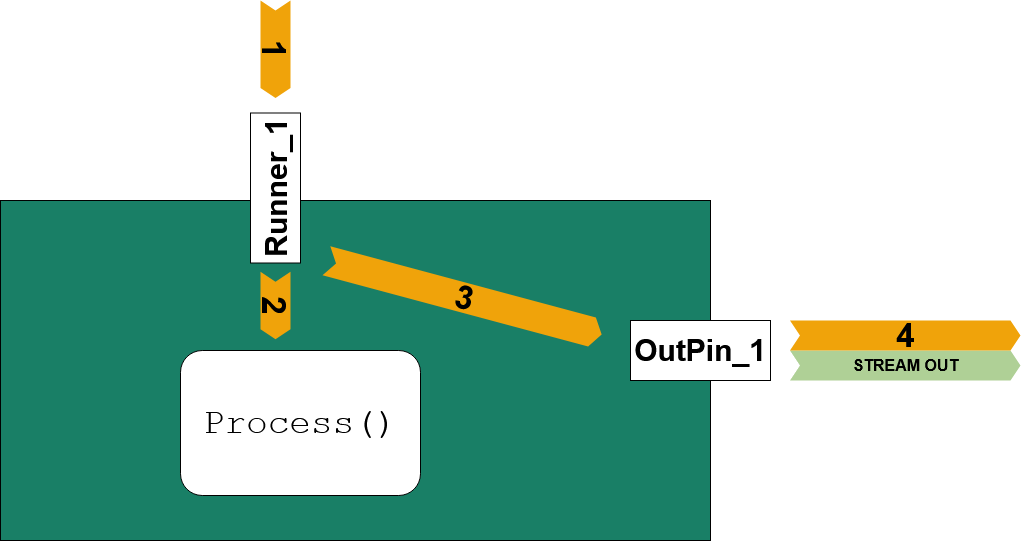
Trigger Call Sequence
- (1) Incoming
RUN_TRIGGER call on 1 will call and wait for Runner_1
- (2)
Runner_1 will call and wait for Process()
- (3) After (2) returned
Runner_1 will call and wait for a RUN_TRIGGER call at OutPin_1
- (4) Only after (4) returned, (3) will return, (1) will return
Example 2: No Inner Pipe to the Outputs
cMyFilter2()
{
using namespace adtf::filter;
using namespace adtf::streaming;
m_pWriter = CreateOutputPin<pin_writer<uint32_t>>("OutPin_1", stream_type_plain<uint32_t>());
using namespace std::chrono_literals;
m_pRunner =
CreateRunner(
"Runner_1", cTimerTriggerHint(100ms),
false);
}
adtf::streaming::IRunner* ) override
{
uint32_t nSampleValue = 123;
m_pWriter->Write(tmTimeOfTriggering, nSampleValue);
}
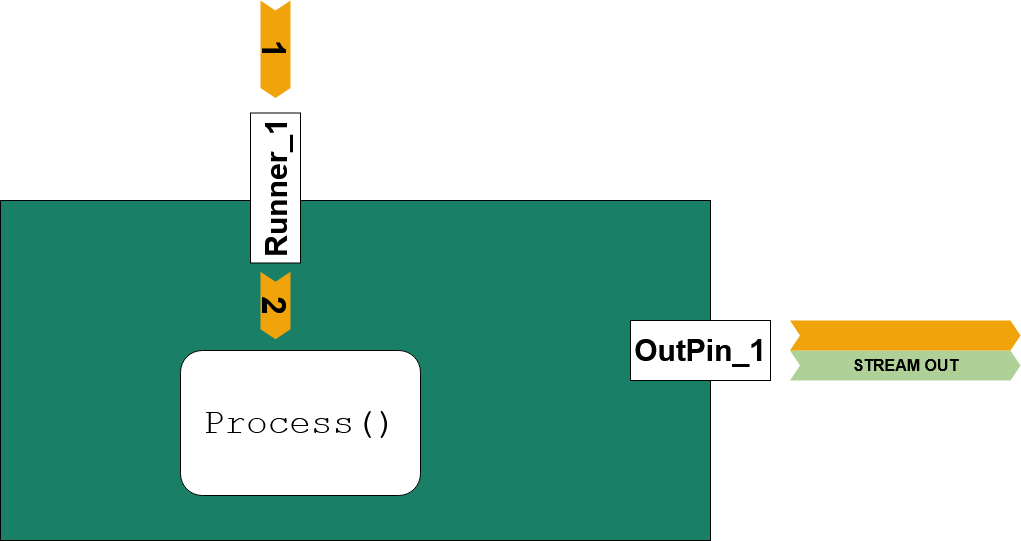
Trigger Call Sequence
- Incoming Trigger on (1) will call and wait on
Runner_1
Runner_1 will call and wait on (2) Process()- After (2) returned (1) returns
Example 3: Inner Pipe and second Hidden Trigger Pipe
cMyFilter3()
{
using namespace adtf::filter;
using namespace adtf::streaming;
m_pWriter = CreateOutputPin<pin_writer<uint32_t>>("OutPin_1", stream_type_plain<uint32_t>());
using namespace std::chrono_literals;
m_pRunner =
CreateRunner(
"Runner_1", cTimerTriggerHint(100ms),
false);
}
adtf::streaming::IRunner* ) override
{
using namespace adtf::streaming;
uint32_t nSampleValue = 123;
m_pWriter->Write(tmTimeOfTriggering, nSampleValue);
}
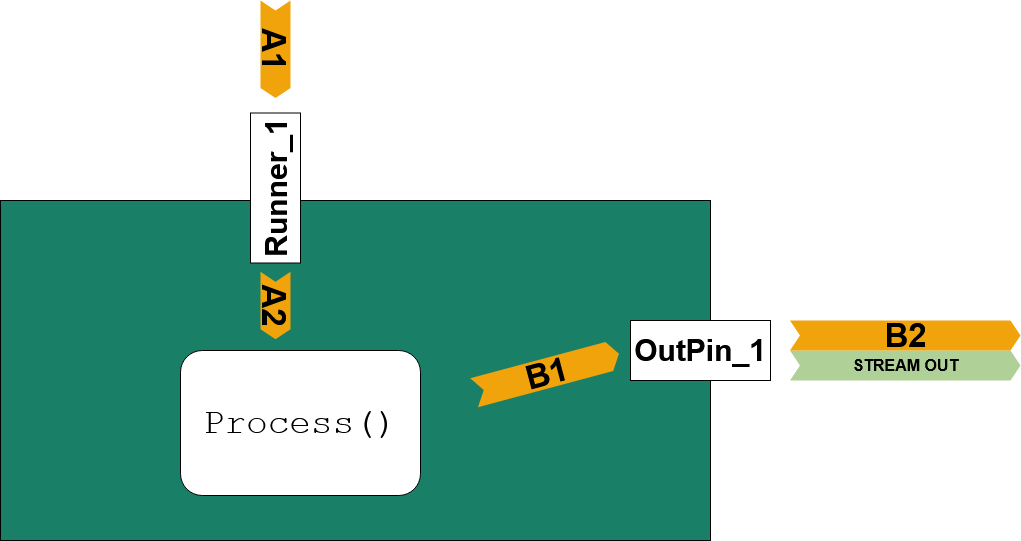
Trigger Call Sequence
- (A1) Incoming Trigger will call and wait for
Runner_1
- (A2)
Runner_1 will call and wait for Process()
Example 4: Inner Pipe with Data Trigger
cMyFilter4()
{
using namespace adtf::filter;
using namespace adtf::streaming;
m_pWriter = CreateOutputPin<pin_writer<uint32_t>>("OutPin_1", stream_type_plain<uint32_t>());
m_pReader1 =
CreateInputPin(
"InPin_1", stream_type_plain<uint32_t>(),
false,
true);
m_pRunner =
CreateRunner(
"Runner_1", cDataTriggerHint(
"InPin_1"),
true);
}
adtf::streaming::IRunner* ) override
{
using namespace adtf::streaming;
adtf::ucom::object_ptr<const ISample> pSample;
while (
IS_OK(m_pReader1->GetNextSample(pSample)))
{
uint32_t nSampleValue = sample_data<uint32_t>(pSample);
}
}
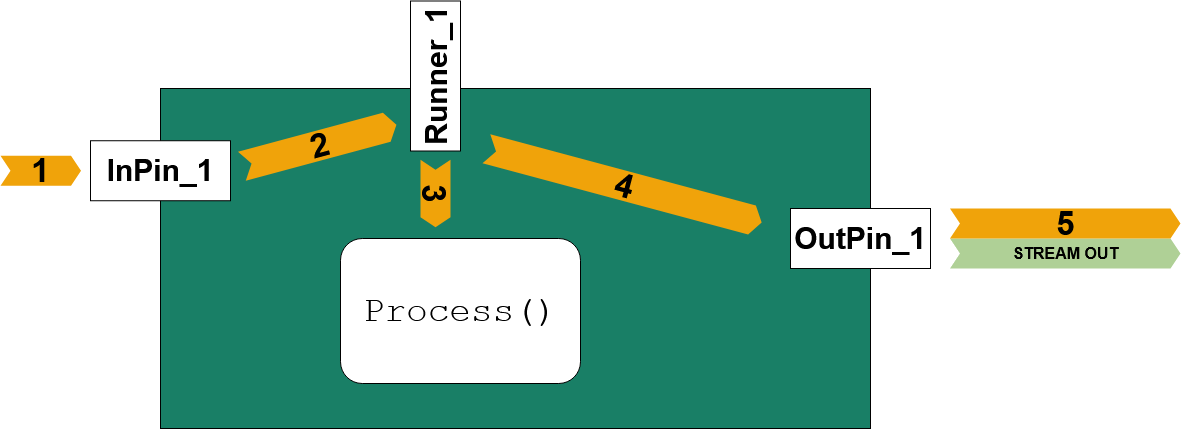
Trigger Call Sequence
- (1) Incoming Data Trigger on
InPin_1 will call and wait for Runner_1 on (2)
- (3)
Runner_1 will call and wait for Process()
- (4) After (3) returned
Runner_1 will call and wait for a RUN_TRIGGER call at OutPin_1
- (5) Only after (5) returned, (4) will return, (2) will return and last (1) will return
Example 5: Inner Pipe with only 1 Data Trigger catched
cMyFilter5()
{
using namespace adtf::filter;
using namespace adtf::streaming;
m_pWriter = CreateOutputPin<pin_writer<uint32_t>>("OutPin_1", stream_type_plain<uint32_t>());
m_pReader1 =
CreateInputPin(
"InPin_1", stream_type_plain<uint32_t>(),
false,
true);
m_pReader2 =
CreateInputPin(
"InPin_2", stream_type_plain<uint32_t>(),
false,
false);
m_pRunner =
CreateRunner(
"Runner_1", cDataTriggerHint(
"InPin_1"),
true);
}
adtf::streaming::IRunner* ) override
{
using namespace adtf::streaming;
adtf::ucom::object_ptr<const ISample> oLastSample1;
adtf::ucom::object_ptr<const ISample> oLastSample2;
RETURN_IF_FAILED(m_pReader1->GetLastSample(oLastSample1));
RETURN_IF_FAILED(m_pReader2->GetLastSample(oLastSample2));
uint32_t nSampleValue = sample_data<uint32_t>(oLastSample1) + sample_data<uint32_t>(oLastSample2);
m_pWriter->Write(tmTimeOfTriggering, nSampleValue);
}
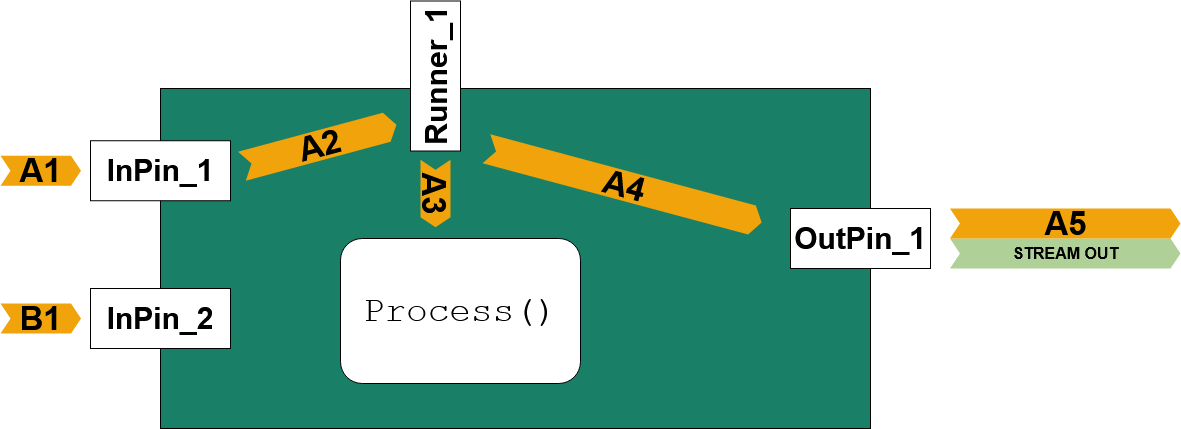
Trigger Call Sequence
- (A1) Incoming Data Trigger on
InPin_1 will call and wait for Runner_1 on (A2)
- (A3)
Runner_1 will call and wait for Process()
- (A4) After (A3) returned
Runner_1 will call and wait for a RUN_TRIGGER call at OutPin_1
- (A5) Only after (A5) returned, (A4) will return, (A2) will return and last (A1) will return
- (B1) The second incoming trigger pipe immediatelly returns, the pipe ends here!
Example 6: Inner Pipe using ProcessInput()
cMyFilter6()
{
using namespace adtf::filter;
using namespace adtf::streaming;
m_pWriter = CreateOutputPin<pin_writer<uint32_t>>("OutPin_1", stream_type_plain<uint32_t>());
m_pReader1 =
CreateInputPin(
"InPin_1", stream_type_plain<uint32_t>(),
true,
true);
m_pReader2 =
CreateInputPin(
"InPin_2", stream_type_plain<uint32_t>(),
false,
false);
}
{
using namespace adtf::streaming;
{
adtf::ucom::object_ptr<const ISample> oLastSample2;
RETURN_IF_FAILED(m_pReader2->GetLastSample(oLastSample2));
uint32_t nSampleValue = sample_data<uint32_t>(pSample) + sample_data<uint32_t>(oLastSample2);
}
else
{
}
}
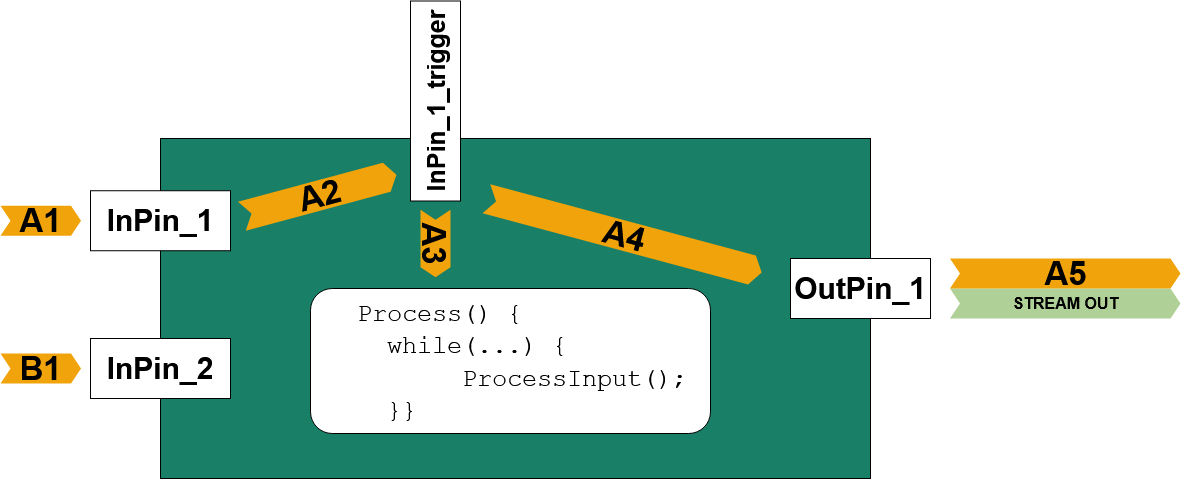
Trigger Call Sequence
- (A1) Incoming Data Trigger on
InPin_1 will call and wait for InPin_1_trigger on (A2)
- (A3)
InPin_1_trigger will call and wait for Process()
- (A4) after (A3) returned
Runner_1 will call and wait for a RUN_TRIGGER call at OutPin_1
- (A5) only after (A5) returned, (A4) will return, (A2) will return and last (A1) will return
- (B1) The second incoming trigger pipe immediatelly returns, the pipe ends here!
Example 7: Inner Pipe using ProcessInput and 2 Data Triggers
cMyFilter7()
{
using namespace adtf::filter;
using namespace adtf::streaming;
m_pWriter = CreateOutputPin<pin_writer<uint32_t>>("OutPin_1", stream_type_plain<uint32_t>());
m_pReader1 =
CreateInputPin(
"InPin_1", stream_type_plain<uint32_t>(),
true,
true);
m_pReader2 =
CreateInputPin(
"InPin_2", stream_type_plain<uint32_t>(),
true,
true);
}
{
using namespace adtf::streaming;
{
adtf::ucom::object_ptr<const ISample> oLastOtherSample;
if (pReader == m_pReader1)
{
RETURN_IF_FAILED(m_pReader2->GetLastSample(oLastOtherSample));
uint32_t nSampleValue = sample_data<uint32_t>(pSample) + sample_data<uint32_t>(oLastOtherSample);
}
else if (pReader == m_pReader2)
{
RETURN_IF_FAILED(m_pReader1->GetLastSample(oLastOtherSample));
uint32_t nSampleValue = sample_data<uint32_t>(pSample) + sample_data<uint32_t>(oLastOtherSample);
}
else
{
}
}
else
{
}
}
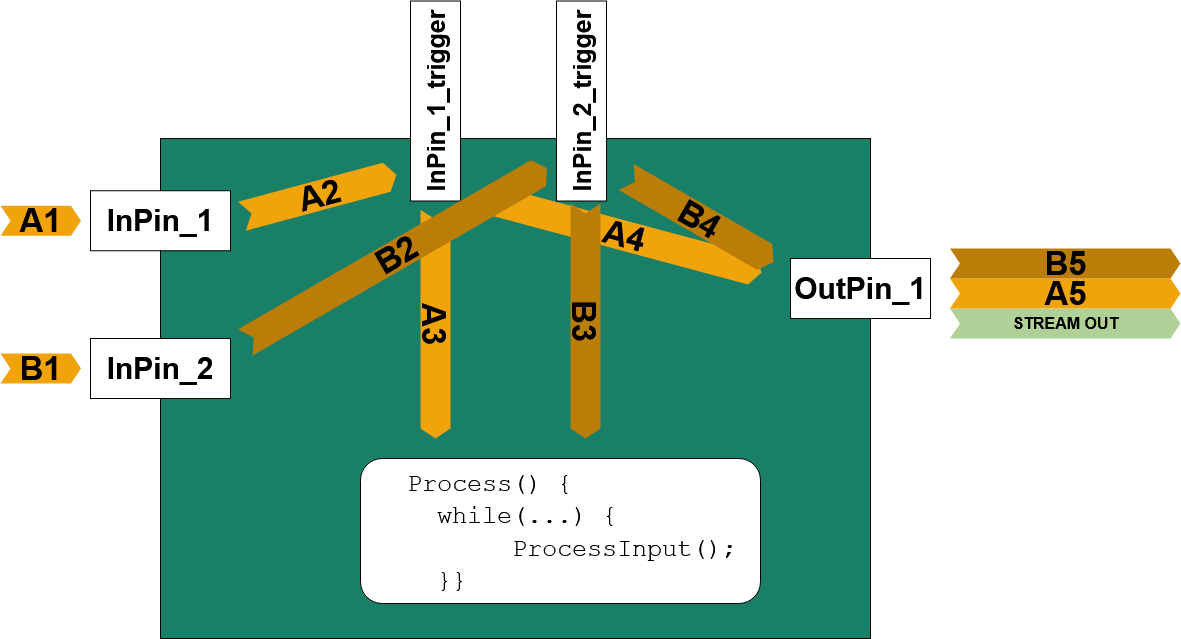
Trigger Call Sequence on A
- (A1) Incoming Data Trigger on
InPin_1 will call and wait for InPin_1_trigger on (A2)
- (A3)
InPin_1_trigger will call and wait for Process() and this the ProcessInput()
- As long as (B3) is currently working, this pipe is blocked
- (A4) After (A3) returned
InPin_1_trigger will call and wait for a RUN_TRIGGER call at OutPin_1
- (A5) Only after (A5) returned, (A4) will return, (A2) will return and last (A1) will return
Trigger Call Sequence on B
- (B1) Incoming data trigger on
InPin_2 will call and wait for InPin_2_trigger on (B2)
- (B3)
InPin_2_trigger will call and wait for Process() and this the ProcessInput()
- As long as (A3) is currently working, this pipe is blocked
- (B4) After (B3) returned
InPin_2_trigger will call and wait for a RUN_TRIGGER call at OutPin_1
- (B5) Only after (B5) returned, (B4) will return, (B2) will return and last (B1) will return
Example 8: Inner Pipe with 1 Runner and 2 Data Triggers
cMyFilter8()
{
using namespace adtf::filter;
using namespace adtf::streaming;
m_pWriter = CreateOutputPin<pin_writer<tUInt32>>("OutPin_1", stream_type_plain<tUInt32>());
m_pReader1 =
CreateInputPin(
"InPin_1", stream_type_plain<tUInt32>(),
false,
false);
m_pReader2 =
CreateInputPin(
"InPin_2", stream_type_plain<tUInt32>(),
false,
false);
m_pRunner =
CreateRunner(
"Runner_1", cDataTriggerHint({
"InPin_1",
"InPin_2"}),
true);
}
adtf::streaming::IRunner* ) override
{
using namespace adtf::streaming;
adtf::ucom::object_ptr<const ISample> pSample;
while (
IS_OK(m_pReader1->GetNextSample(pSample)))
{
tUInt32 nSampleValue = sample_data<tUInt32>(pSample);
}
while (
IS_OK(m_pReader2->GetNextSample(pSample)))
{
tUInt32 nSampleValue = sample_data<tUInt32>(pSample);
}
}
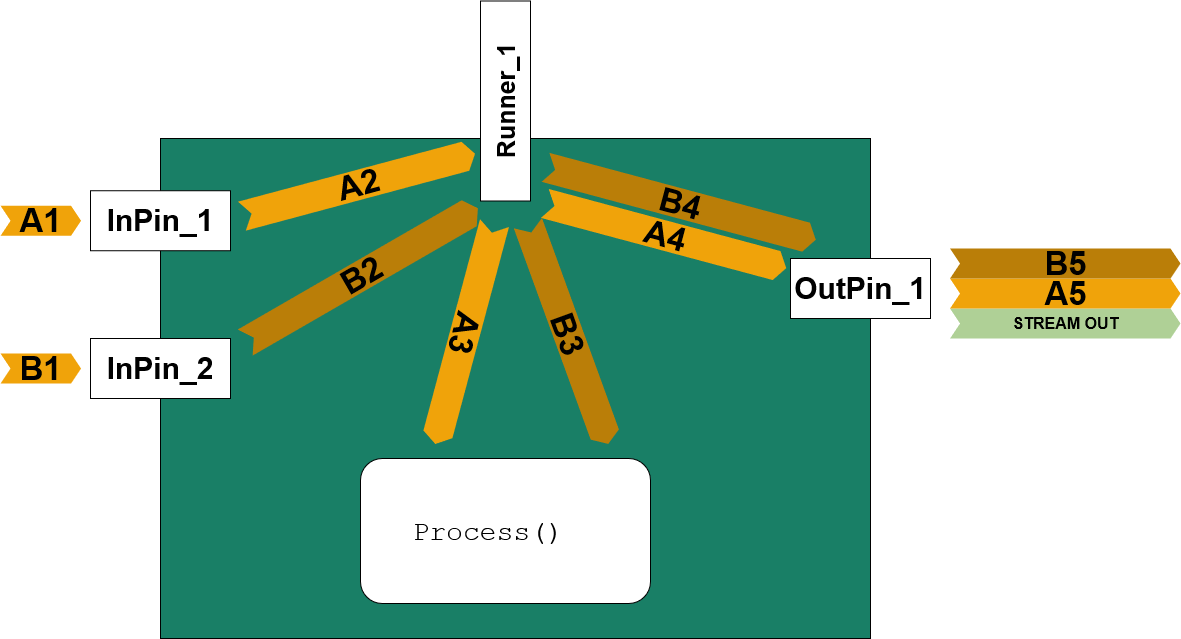
Trigger Call Sequence on A
- (A1) Incoming Data Trigger on
InPin_1 will call and wait for Runner_1 (A2) (without a InPin_1_trigger call in between)
- (A3)
Runner_1 will call and wait for Process() to return
- By using
CreateRunner() the filters Process() call is automatically synchronized against (B3) with a mutex
- After (A3) returned (A4) and (A5) can be performed
- (A5) Only after (A5) returned, (A4) will return, (A2) will return and last (A1) will return
Trigger Call Sequence on B
- (B1) Incoming data trigger on
InPin_2 will also directly call and wait on Runner_1 on (B2)
- (B3)
Runner_1 will call and wait for Process()
- (B3) Is synchronized and protected against parallel (A3) call.
- (B4) Is called after (B3) returned from
Process() will call and wait for a RUN_TRIGGER call at OutPin_1
- (B5) Only after (B5) returned, (B4) will return, (B2) will return and last (B1) will return
ManualTrigger call
It is possible to call ManualTrigger() after writing samples and stream types onto the sample writer - but you should prevent that!
The reasons for this is:
- Each manual trigger call might be the beginning of a new trigger pipe within the filter graph!
- Each manual trigger may double or at least raise the amount of trigger calls in the system, if there are already inner pipes configured!
But the ManualTrigger() must be called by a streaming source that is mostly the beginning of trigger pipe with data triggers.
The design purpose for a good filter and so a good filter graph is, to prevent the ManualTrigger() call.
Only filters with a well formed inner pipe are reconfigurable in their runtime behaviour.
Overview of Writing and Reading Data
The following chapters show how to write and read different kind of data types.
Arithmetic data
- Supported data types
uint8_t, int8_t, uint16_t, int16_t, uint32_t, int32_t, int64_t, float, double
- Recommended stream type to use:
Use the adtf::streaming::stream_type_plain as instance of adtf/plaintype for single small arithmetic data.
- Output
Describe the data with adtf::streaming::stream_type_plain
using namespace adtf::streaming;
using namespace adtf::filter;
m_pWriter_1 = CreateOutputPin<pin_writer<uint8_t>>("out_plain_1", stream_type_plain<uint8_t>());
m_pWriter_2 =
CreateOutputPin(
"out_plain_2", stream_type_plain<uint8_t>());
m_pRunner =
CreateRunner(
"write_plains", cTimerTriggerHint(100));
- Write samples
Write the data with the help of operator<< or adtf::streaming::output_sample_data
tResult Process(adtf::base::tNanoSeconds tmTrigger, adtf::streaming::IRunner* pRunner)
override
{
using namespace adtf::streaming;
if (pRunner == m_pRunner)
{
uint8_t nValue = 42;
RETURN_IF_FAILED(m_pWriter_1->Write(tmTrigger, nValue));
using namespace adtf::streaming;
*m_pWriter_2 << output_sample_data(tmTrigger, nValue);
}
}
- Input
Describe the expected input with adtf::streaming::stream_type_plain
using namespace adtf::streaming;
m_pReader_1 =
CreateInputPin(
"in_plain_1", stream_type_plain<uint8_t>());
m_pReader_2 =
CreateInputPin(
"in_plain_2", stream_type_plain<uint8_t>());
- Read samples
Read the data with the help of adtf::streaming::sample_data
{
using namespace adtf::streaming;
if (pReader == m_pReader_1)
{
sample_data<uint8_t> oSampleData(pSample);
uint8_t nValue = *oSampleData;
nValue = oSampleData.GetData();
}
}
Array of arithmetic data
- Supported data types
std::array<T, N>, where T is: uint8_t, int8_t, uint16_t, int16_t, uint32_t, int32_t, int64_t, float, double
T[N], where T is: uint8_t, int8_t, uint16_t, int16_t, uint32_t, int32_t, int64_t, float, double
- Recommended stream type to use
Use adtf::streaming::stream_type_plain as instance of adtf/plaintype for arrays of arithmetic data.
- Output for
std::array<T, N>
Describe the data with adtf::streaming::stream_type_plain
using namespace adtf::streaming;
using namespace adtf::filter;
m_pWriter_1 = CreateOutputPin<pin_writer<std::array<uint8_t, 4>>>("out_plain_std_array_1",
stream_type_plain<std::array<uint8_t, 4>>());
m_pWriter_2 =
CreateOutputPin(
"out_plain_std_array_2", stream_type_plain<std::array<uint8_t, 4>>());
m_pRunner =
CreateRunner(
"write_std_arrays", cTimerTriggerHint(100));
- Write samples
std::array<T, N>
Write the data with the help of the pin_writer<T>::Write method or adtf::streaming::output_sample_data
tResult Process(adtf::base::tNanoSeconds tmTigger, adtf::streaming::IRunner* pRunner)
override
{
if (pRunner == m_pRunner)
{
std::array<uint8_t, 4> aStdArrayValues = {1, 2, 3, 4};
RETURN_IF_FAILED(m_pWriter_1->Write(tmTigger, aStdArrayValues));
using namespace adtf::streaming;
*m_pWriter_2 << output_sample_data(tmTigger, aStdArrayValues);
}
}
- Input
std::array<T, N>
Describe the expected input with adtf::streaming::stream_type_plain
using namespace adtf::streaming;
m_pReader_1 =
CreateInputPin(
"in_plain_std_array_1", stream_type_plain<std::array<uint8_t, 4>>());
m_pReader_2 =
CreateInputPin(
"in_plain_std_array_2", stream_type_plain<std::array<uint8_t, 4>>());
- Read samples
std::array<T, N>
Read the data with the help of adtf::streaming::sample_data
{
using namespace adtf::streaming;
if (pReader == m_pReader_1)
{
sample_data<std::array<uint8_t, 4>> oSampleDataStdArray(pSample);
std::array<uint8_t, 4> aStdArrayValues = *oSampleDataStdArray;
aStdArrayValues = oSampleDataStdArray.GetData();
}
}
- Output for
T[N]
Describe the data with adtf::streaming::stream_type_plain
using namespace adtf::streaming;
using namespace adtf::filter;
m_pWriter_1 = CreateOutputPin<pin_writer<uint8_t[4]>>("out_plain_array_1", stream_type_plain<uint8_t[4]>());
m_pWriter_2 =
CreateOutputPin(
"out_plain_array_2", stream_type_plain<uint8_t[4]>());
m_pRunner =
CreateRunner(
"write_arrays", cTimerTriggerHint(100));
- Write samples for
T[N]
Write the data with the help of pin_writer<T>::Write method or adtf::streaming::output_sample_data
tResult Process(adtf::base::tNanoSeconds tmTrigger, adtf::streaming::IRunner* pRunner)
{
if (pRunner == m_pRunner)
{
uint8_t aArrayValues[4] = {1, 2, 3, 4};
RETURN_IF_FAILED(m_pWriter_1->Write(tmTrigger, aArrayValues));
using namespace adtf::streaming;
*m_pWriter_2 << output_sample_data(tmTrigger, aArrayValues);
}
}
- Input for
T[N]
Describe the expected input with adtf::streaming::stream_type_plain
using namespace adtf::streaming;
m_pReader_1 =
CreateInputPin(
"in_plain_array_1", stream_type_plain<uint8_t[4]>());
m_pReader_2 =
CreateInputPin(
"in_plain_array_2", stream_type_plain<uint8_t[4]>());
- Read Samples for
T[N]
Read the data with the help of adtf::streaming::sample_data
{
using namespace adtf::streaming;
if (pReader == m_pReader_1)
{
sample_data<uint8_t[4]> oSampleDataArray(pSample);
for (auto nIndex = 0; nIndex < 4; ++nIndex)
{
LOG_INFO(
"Value[%d]=%d",
int(nIndex),
int((*oSampleDataArray)[nIndex]));
}
for (auto nIndex = 0; nIndex < 4; ++nIndex)
{
LOG_INFO(
"Value[%d]=%d",
int(nIndex),
int(oSampleDataArray.GetData()[nIndex]));
}
}
}
Structured data
- Supported data types
The conditions to use structured data as content of a sample is:
- The data type has to fulfill the condition of
std::is_trivially_copyable<T>::value to be true
- No pointer types are allowed as member
- All members has to fullfill the condition of
std::is_trivially_copyable<T>::value to be true
struct tMyType
{
int32_t m_nValue1;
double m_fValue2;
bool m_bArray[2];
};
It is also possible to define a DDL description file and use the generated type by MD Generator Tool.
- Recommended stream type to use
Use the adtf::mediadescription::stream_type_default as instance of adtf/default for structured data.
Usually, you are allowed to use every kind of your own custom stream meta types to describe the structured data you want to write.
The big advantage of using the adtf::mediadescription::stream_type_default is to describe the content by the help of the Data Definition Language (DDL). See also ADTF and DDL, how to create a description for your structured data.
- Output
Describe the data with adtf::mediadescription::stream_type_default
using namespace adtf::mediadescription;
using namespace adtf::filter;
auto oDescriptionForMyType = structure<tMyType>("tMyType")
.Add("m_nValue1", &tMyType::m_nValue1)
.Add("m_fValue2", &tMyType::m_fValue2)
.Add("m_bArray", &tMyType::m_bArray);
m_pWriter_1 = CreateOutputPin<pin_writer<tMyType>>("out_default_1",
stream_type_default<>(oDescriptionForMyType));
m_pWriter_3 =
CreateOutputPin(
"out_default_2", stream_type_default<tMyTypeWithMDGen>());
m_pRunner =
CreateRunner(
"write_defaults", cTimerTriggerHint(100));
- Write Samples
Write the data with the help of pin_writer<T>::Write method or adtf::streaming::output_sample_data
tResult Process(adtf::base::tNanoSeconds tmTrigger, adtf::streaming::IRunner* pRunner)
override
{
if (pRunner == m_pRunner)
{
tMyType sValues = {1, 2.0, {true, false}};
RETURN_IF_FAILED(m_pWriter_1->Write(tmTrigger, sValues));
using namespace adtf::streaming;
*m_pWriter_2 << output_sample_data(tmTrigger, sValues);
tMyTypeWithMDGen sValuesWithMDGen = {1, 2.0, {true, false}};
*m_pWriter_3 << output_sample_data(tmTrigger, sValuesWithMDGen);
}
}
- Input
Describe the expected input with adtf::mediadescription::stream_type_default
using namespace adtf::mediadescription;
m_pReader_1 =
CreateInputPin(
"in_default_1", stream_type_default<>(oDescriptionForMyType));
m_pReader_3 =
CreateInputPin(
"in_default_3", stream_type_default<tMyTypeWithMDGen>());
- Read Samples
Read the data with the help of adtf::streaming::sample_data
{
using namespace adtf::streaming;
if (pReader == m_pReader_1)
{
sample_data<tMyType> oSampleData(pSample);
tMyType sValuesCopy = *oSampleData;
sValuesCopy = oSampleData.GetData();
}
else if (pReader == m_pReader_3)
{
sample_data<tMyTypeWithMDGen> oSampleData(pSample);
tMyTypeWithMDGen sValuesCopy = *oSampleData;
sValuesCopy = oSampleData.GetData();
}
}
Array of structured data
- Supported data types
The conditions to use an array of structured data as content of a sample is:
- The data type has to fulfill the condition of
std::is_trivially_copyable<T>::value to be true
- No pointer types are allowed as member
- All members has to fullfill the condition of
std::is_trivially_copyable<T>::value to be true
struct tMyType
{
int32_t m_nValue1;
double m_fValue2;
bool m_bArray[2];
};
std::array<T, N>, where T is a supported structured data type (i.e. std::array<tMyType, 4> aValues;)
T[N], where T is a supported structured data type (i.e. tMyType aValues[4];)
It is also possible to define a DDL description file and use the generated type by MD Generator Tool.
- Recommended stream type to use
Use the adtf::mediadescription::stream_type_default_array as instance of adtf/default for arrays of structured data.
You are allowed to use every kind of your own custom stream meta types to describe the structured data you want to write. The advantage of using the adtf::mediadescription::stream_type_default_array is to describe the content by the help of the Data Definition Language (DDL). See also ADTF and DDL how to create a description for your structured data. It will additionally handle the creation of the array type within description.
- Output
Describe the data with adtf::mediadescription::stream_type_default_array
using namespace adtf::mediadescription;
using namespace adtf::filter;
auto oDescriptionForMyType = structure<tMyType>("tMyType")
.Add("m_nValue1", &tMyType::m_nValue1)
.Add("m_fValue2", &tMyType::m_fValue2)
.Add("m_bArray", &tMyType::m_bArray);
stream_type_default_array<>(oDescriptionForMyType, 4));
m_pWriter_2 = CreateOutputPin<pin_writer<tMyType[4]>>("out_default_array_2",
stream_type_default_array<>(oDescriptionForMyType, 4));
m_pWriter_3 =
CreateOutputPin(
"out_default_array_3", stream_type_default_array<tMyTypeWithMDGen[4]>());
m_pRunner =
CreateRunner(
"write_default_arrays", cTimerTriggerHint(100));
- Write samples
Write the data with the help of pin_writer<T>::Write method or adtf::streaming::output_sample_data
tResult Process(adtf::base::tNanoSeconds tmTrigger, adtf::streaming::IRunner* pRunner)
{
if (pRunner == m_pRunner)
{
std::array<tMyType, 4> aStdArray = {tMyType{1, 2.0, {true, false}}, tMyType{2, 3.0, {false, false}},
tMyType{3, 4.0, {true, true}}, tMyType{4, 5.0, {false, true}}};
using namespace adtf::streaming;
*m_pWriter_1 << output_sample_data(tmTrigger, aStdArray);
tMyType aValues[4] = {tMyType{1, 2.0, {true, false}}, tMyType{2, 3.0, {false, false}},
tMyType{3, 4.0, {true, true}}, tMyType{4, 5.0, {false, true}}};
*m_pWriter_2 << output_sample_data(tmTrigger, aValues);
RETURN_IF_FAILED(m_pWriter_2->Write(tmTrigger, aValues));
tMyTypeWithMDGen aValuesMDGen[4] = {tMyTypeWithMDGen{1, 2.0, {true, false}},
tMyTypeWithMDGen{2, 3.0, {false, false}},
tMyTypeWithMDGen{3, 4.0, {true, true}},
tMyTypeWithMDGen{4, 5.0, {false, true}}};
*m_pWriter_3 << output_sample_data(tmTrigger, aValuesMDGen);
}
}
- Input
Describe the expected input with adtf::mediadescription::stream_type_default_array
using namespace adtf::mediadescription;
stream_type_default_array<>(oDescriptionForMyType, 4));
stream_type_default_array<>(oDescriptionForMyType, 4));
stream_type_default_array<tMyTypeWithMDGen[4]>());
- Read samples
Read the data with the help of adtf::streaming::sample_data
{
using namespace adtf::streaming;
if (pReader == m_pReader_1)
{
sample_data<std::array<tMyType, 4>> oSampleStdArrayData(pSample);
std::array<tMyType, 4> aStdArrayCopy = *oSampleStdArrayData;
aStdArrayCopy = oSampleStdArrayData.GetData();
}
else if (pReader == m_pReader_2)
{
sample_data<tMyType[4]> oSampleArrayData(pSample);
tMyType aValuesCopy[4];
for (auto nIdx = 0; nIdx < 4; ++nIdx)
{
aValuesCopy[nIdx] = (*oSampleArrayData)[nIdx];
}
for (auto nIdx = 0; nIdx < 4; ++nIdx)
{
aValuesCopy[nIdx] = oSampleArrayData.GetData()[nIdx];
}
}
else if (pReader == m_pReader_3)
{
sample_data<tMyTypeWithMDGen[4]> oSampleArrayData(pSample);
}
}
Video Image data
- Supported type
A bitmap array of byte which can be described via adtf::streaming::tStreamImageFormat.
- Recommended stream type to use
Use the adtf::streaming::stream_type_image as instance of adtf/image for a sequence of images.
- Output
Describe the data with adtf::streaming::stream_type_image
using namespace adtf::streaming;
tStreamImageFormat sFormat{stream_image_format::GREYSCALE_8::FormatName, 800, 600, 800 * 600};
m_pRunner =
CreateRunner(
"write_videos", cTimerTriggerHint(100));
- Write samples
Write the data with the help of operator<< for the sample
tResult Process(adtf::base::tNanoSeconds tmTrigger, adtf::streaming::IRunner* pRunner)
override
{
using namespace adtf::streaming;
adtf::ucom::object_ptr<ISample> pSample;
{
adtf::ucom::object_ptr_locked<ISampleBuffer> pSampleBuffer;
RETURN_IF_FAILED(pSample->WriteLock(pSampleBuffer, 800 * 600));
memset(pSampleBuffer->GetPtr(), pSampleBuffer->GetSize(), 0xF0);
}
*m_pWriter_1 << pSample;
}
- Input
Describe the expected input with adtf::streaming::stream_type_image
using namespace adtf::streaming;
tStreamImageFormat sFormat{stream_image_format::GREYSCALE_8::FormatName, 800, 600, 800*600};
m_pReader_1 =
CreateInputPin(
"in_video_1", stream_type_image(sFormat));
- Read samples
Read the data directly from the sample
{
using namespace adtf::streaming;
if (pReader == m_pReader_1)
{
adtf::ucom::object_ptr_shared_locked<const ISampleBuffer> pSampleBuffer;
RETURN_IF_FAILED(pSample->Lock(pSampleBuffer));
if (pSampleBuffer->GetSize() == 800 * 600)
{
const uint8_t* pPixels = static_cast<const uint8_t*>(pSampleBuffer->GetPtr());
LOG_INFO(
"The 8Bit greyscale pixel[0] has following value: %d",
int(pPixels[0]));
}
else
{
RETURN_ERROR_DESC(ERR_MEMORY,
"The size of the image is not as expected 800*600*8Bit");
}
}
}
String data
- Supported type
std::string, std::u16string
- Recommended stream type to use
Use the adtf::streaming::stream_type_string as instance of adtf/string for string data.
- Output for
std::string
Describe the data with adtf::streaming::stream_type_string
using namespace adtf::streaming;
using namespace adtf::filter;
m_pWriter_1 = CreateOutputPin<pin_writer<std::string>>("out_string_1",
stream_type_string<std::string>());
m_pWriter_2 = CreateOutputPin<pin_writer<std::u16string>>("out_string_2",
stream_type_string<std::u16string>());
m_pRunner =
CreateRunner(
"write_strings", cTimerTriggerHint(100));
- Write samples for
std::string
Write the data with the help of operator<<
tResult Process(adtf::base::flash::tNanoSeconds tmTrigger, adtf::streaming::ant::IRunner* pRunner)
override
{
if (pRunner == m_pRunner)
{
std::string strStringToTransmit = "This is the output string";
RETURN_IF_FAILED(m_pWriter_1->Write(tmTrigger, strStringToTransmit));
std::u16string strU16StringToTransmit = u"This is the output u16string";
RETURN_IF_FAILED(m_pWriter_2->Write(tmTrigger, strU16StringToTransmit));
}
}
- Input for
std::string
Describe the expected input with adtf::streaming::stream_type_string
using namespace adtf::streaming;
m_pReader_1 =
CreateInputPin(
"in_string_1", stream_type_string<std::string>());
m_pReader_2 =
CreateInputPin(
"in_string_2", stream_type_string<std::u16string>());
- Read samples for
std::string
Read the data with the help of adtf::streaming::sample_data
{
using namespace adtf::streaming;
if (pReader == m_pReader_1)
{
sample_data<std::string> oSampleData(pSample);
std::string strCopy = *oSampleData;
strCopy = oSampleData.GetData();
}
else if (pReader == m_pReader_2)
{
sample_data<std::u16string> oSampleData(pSample);
std::u16string strU16Copy = *oSampleData;
strU16Copy = oSampleData.GetData();
}
}
Dynamic arrays within structured data
- Possible data types
The conditions to use an array of structured data with dynamic content within samples is:
- The structured data must be allocated in one whole block of memory.
- No pointer types are allowed as member
- All members except the flexible array member has to fullfill the condition of
std::is_trivially_copyable<T>::value to be true
struct tMyTypeDynamic
{
uint64_t m_nArraySize;
int32_t m_aDynamicArray[];
static size_t EvaluateSize(size_t nArraySize)
{
return sizeof(struct tMyTypeDynamic) + nArraySize * sizeof(int32_t);
}
};
- Recommended stream type to use
Use the adtf::mediadescription::stream_type_default as instance of adtf/default for dynamic arrays of structured data. The dynamic content can be described via arraysize within the DDL description.
- Output
Describe the data with adtf::mediadescription::stream_type_default
using namespace adtf::mediadescription;
constexpr auto strStructNameForMyTypeDynamic = "tMyTypeDynamic";
constexpr auto strDescriptionForMyTypeDynamic =
R"(<struct name="tMyTypeDynamic" alignment="8" version="1">
<element name="m_nArraySize" type="uint64_t" arraysize="1">
<deserialized alignment="8"/>
<serialized bytpos="0" byteorder="LE"/>
</element>
<element name="m_aDynamicArray" type="int32_t" arraysize="m_nArraySize">
<deserialized alignment="4"/>
<serialized bytpos="8" byteorder="LE"/>
</element>
</struct>)";
stream_type_default<>(strStructNameForMyTypeDynamic, strDescriptionForMyTypeDynamic));
stream_type_default<>(strStructNameForMyTypeDynamic, strDescriptionForMyTypeDynamic));
m_pRunner =
CreateRunner(
"write_dynamics", cTimerTriggerHint(100));
- Write samples
Write the data directly within samples memory
tResult Process(adtf::base::tNanoSeconds tmTrigger, adtf::streaming::IRunner* pRunner)
override
{
using namespace adtf::streaming;
if (pRunner == m_pRunner)
{
adtf::ucom::object_ptr<ISample> pSample;
{
adtf::ucom::object_ptr_locked<ISampleBuffer> pSampleBuffer;
RETURN_IF_FAILED(pSample->WriteLock(pSampleBuffer, tMyTypeDynamic::EvaluateSize(4)));
tMyTypeDynamic* pMyDynamicArray = static_cast<tMyTypeDynamic*>(pSampleBuffer->GetPtr());
pMyDynamicArray->m_nArraySize = 4;
for (auto nIdx = 0; nIdx < 4; ++nIdx)
{
pMyDynamicArray->m_aDynamicArray[nIdx] = nIdx;
}
}
*m_pWriter_1 << pSample;
}
}
- Input
Describe the expected input with adtf::mediadescription::stream_type_default
using namespace adtf::mediadescription;
stream_type_default<>(strStructNameForMyTypeDynamic, strDescriptionForMyTypeDynamic));
stream_type_default<>(strStructNameForMyTypeDynamic, strDescriptionForMyTypeDynamic));
- Read samples
Read the data directly from the samples buffer
{
using namespace adtf::streaming;
if (pReader == m_pReader_1)
{
adtf::ucom::object_ptr_shared_locked<const ISampleBuffer> pSampleBuffer;
RETURN_IF_FAILED(pSample->Lock(pSampleBuffer));
const tMyTypeDynamic* pMyArray = static_cast<const tMyTypeDynamic*>(pSampleBuffer->GetPtr());
if (tMyTypeDynamic::EvaluateSize(pMyArray->m_nArraySize) == pSampleBuffer->GetSize())
{
LOG_INFO(
"The current array size is %zu",
size_t(pMyArray->m_nArraySize));
}
else
{
RETURN_ERROR_DESC(ERR_MEMORY,
"set dynamic array size and sample size does not fit!");
}
}
}
Custom data
You may define your own stream meta type to describe the data you want to transmit and receive, see also Custom Stream Meta Type.
The differences between the other and the recommended stream types are:
- You can define own properties to describe the content.
- You are able to implement an own
my_custom_stream_meta_type::IsCompatible.
- You can hide the content of the samples, because only you know the properties meanings.
- As long as you not set the
md_struct and md_definition property, you can not use any standard displays within ADTF Qt5
- Example definition
struct my_custom_stream_meta_type
{
static constexpr const tChar* const MetaTypeName = "cppDev/my_custom_type";
static constexpr const tChar* const SecretContentID = "secret_content_id";
static constexpr const tChar* const Version = "version_of_type";
{
pProperties->SetProperty(adtf::base::property<uint16_t>(SecretContentID, 0));
pProperties->SetProperty(adtf::base::property<adtf_util::cString>(Version, "cppDev 2020-1.0"));
}
};
{
my_custom_stream_type()
{
}
my_custom_stream_type(uint16_t nSecretContentNo)
{
adtf::ucom::object_ptr<adtf::base::IProperties> pConfig;
nSecretContentNo);
}
};
struct tMyCustomData1
{
uint64_t nValue1;
int64_t nValue2;
uint32_t nValue3;
};
struct tMyCustomData2
{
double nValue1;
tMyCustomData1 aArrayData[3];
};
- Output
Describe the data with your own stream meta type
using namespace adtf::filter;
m_pWriter_1 = CreateOutputPin<pin_writer<tMyCustomData1>>("out_custom_1", my_custom_stream_type(1));
m_pRunner =
CreateRunner(
"write_customs", cTimerTriggerHint(100));
- Write samples
Write the samples with the operator<< or adtf::streaming::output_sample_data
tResult Process(adtf::base::tNanoSeconds tmTrigger, adtf::streaming::IRunner* pRunner)
override
{
if (pRunner == m_pRunner)
{
m_pWriter_1->Write(tmTrigger, tMyCustomData1{1, 2, 3});
*m_pWriter_2 << adtf::streaming::output_sample_data(tmTrigger, tMyCustomData2{1.0, {{1, 2, 3}, {}, {}}});
}
}
- Input
Describe the expected input with your own stream meta type
using namespace adtf::streaming;
m_pReader_1 =
CreateInputPin(
"in_custom_1", my_custom_stream_type(1));
m_pReader_2 =
CreateInputPin(
"in_custom_2", my_custom_stream_type(2));
- Read samples
Read the data with the help of adtf::streaming::sample_data
{
if (pReader == m_pReader_1)
{
using namespace adtf::streaming;
sample_data<tMyCustomData1> oSampleData(pSample);
tMyCustomData1 sCopyOfCustomData = *oSampleData;
sCopyOfCustomData = oSampleData.GetData();
}
}